
Think of workflow automation as the digital plumbing that connects all your different software tools. It lets them talk to each other and work together on their own, without you having to manually shuttle data between them.
It’s the secret sauce for scaling your operations efficiently. You can build custom workflows to handle all those repetitive, mind-numbing tasks—like data entry, sending notifications, or managing approvals. This frees up your team to focus on the kind of strategic work that actually grows the business.
Understanding Modern Workflow Automation
To really get the most out of these tools, you need to look past the buzzwords. It’s not just about connecting App A to App B anymore. The drive for serious operational efficiency, mixed with the rise of AI, has made today’s automation platforms incredibly powerful.
But here’s something I’ve learned from years of doing this: not all automation solutions are built the same. You need to know what you’re buying into. The market really breaks down into two main areas, and knowing the difference is key to spending your money wisely.
Software vs. Services
First, you have the software itself. These are the platforms you’ve probably heard of, like Zapier, Workato, or Make. They give you the visual builders and connectors—the raw ingredients—to create your own automated processes.
Then, you have the services layer. This is where the human expertise comes in. We’re talking about implementation partners, consultants, and agencies that design, build, and maintain these workflows for you. As your automations get more critical and complex, you’ll find that having an expert on call is non-negotiable.
A mistake I see all the time is companies investing heavily in a powerful tool but skimping on the expertise to run it. A top-of-the-line platform is useless if your workflows are poorly designed. For any serious SaaS operation, the sweet spot is almost always a mix of great software and skilled service partners.
So, how do you decide where to put your resources? The table below breaks down the two sides of the market.
Core Components of Workflow Automation Offerings
| Component | Primary Focus | Key Driver | Best For |
|---|---|---|---|
| Software | Providing the platform and tools for building automations (the “engine”). | High demand for streamlining internal processes and connecting apps. | Teams with in-house technical skills or for simpler, non-critical automations. |
| Services | Offering expert implementation, strategy, and ongoing management (the “architect”). | The growing complexity of automation projects requiring specialized knowledge. | Businesses with complex needs, limited internal resources, or mission-critical workflows. |
Breaking it down this way helps clarify where your budget should go. Right now, the software side of the market is bigger simply because so many companies are trying to streamline their processes. But the services segment is catching up fast. Why? Because businesses are realizing that complex automation isn’t a “set it and forget it” task. It needs ongoing care, maintenance, and expertise. If you’re interested in the numbers, you can explore the full market dynamics to see these trends for yourself.
Ultimately, your success hinges on finding the right balance between the automation software you choose and the expert services you bring in. The goal isn’t just to fix a problem today, but to build a resilient system that grows and adapts right along with your company.
Finding High-Impact Automation Opportunities

When starting with automation, the biggest mistake I see SaaS operators make is trying to boil the ocean. They get excited and attempt to automate everything all at once. This shotgun approach almost always backfires, creating more chaos than it resolves.
Real success isn’t about massive, complex projects from day one. It’s about being surgical. You need to pinpoint the specific workflows that will give you the biggest bang for your buck.
Before you can automate a single task, you have to get a handle on what’s really going on inside your business. This means it’s time for a thorough workflow audit. The goal here isn’t just to make a long list of tasks; it’s to truly understand how work, data, and decisions flow between your teams.
Go Department by Department
Start by mapping out the core processes in each key area of your company. Don’t do this in a vacuum from your corner office—get out there and talk to the people doing the work every day. Your support team, your sales reps, your finance clerks… they know exactly where the bottlenecks and soul-crushing manual tasks are hiding.
You’re hunting for tasks that are:
- Repetitive and Rule-Based: Think copy-pasting data between spreadsheets, sending the same confirmation email a dozen times a day, or manually moving files.
- Time-Consuming but Low-Value: These are the jobs that eat up hours but don’t require an ounce of strategic thought.
- Prone to Human Error: Any process where a simple typo in a customer record can snowball into a major headache down the line.
- Jumping Between Systems: Watch for any workflow that forces an employee to manually shuttle information from your CRM to your help desk to your billing platform.
My advice? Start small. Seriously. Don’t try to tackle a massive, cross-departmental process right out of the gate. Pick something small and painful, like lead assignment or sending new customer welcome emails. Quick wins build incredible momentum and get your team excited about what’s possible.
Use a Simple Scoring System to Prioritize
Once you have a list of potential automation targets, you need to decide where to start. A simple scoring matrix is your best friend here. It helps you focus your energy where it matters most and keeps you from wasting time on automations that sound cool but offer little real-world benefit.
For each potential workflow, score it from 1 to 5 on these three criteria:
- Time Savings: How many hours per week would this realistically save the team? (5 = huge savings)
- Error Reduction: How likely is this to eliminate costly mistakes? (5 = high impact)
- Implementation Effort: How hard is this to actually build? Be honest. (1 = very difficult, 5 = super easy)
Now, just add up the scores. The workflows with the highest totals are your green-light projects. An easy-to-build automation that saves 10 hours a week and kills a common error? That’s your perfect starting point. The insights from a simple audit like this form the bedrock of a strong workflow automation strategy.
This approach is especially critical for IT and Operations teams, where cloud-based Workflow-as-a-Service (WaaS) platforms are now standard. These two functions alone accounted for a massive 39.4% of the workflow automation market in 2023, as companies lean on WaaS for everything from support ticket routing to system monitoring. You can dig into the WaaS market trends to see just how integral this has become.
By auditing and prioritizing like this, you can apply the same winning principles to any department and make sure your automation efforts actually move the needle.
Choosing the Right Automation Platform
With the market for workflow automation SaaS completely saturated, picking the right platform can be paralyzing. Make the wrong call, and you’re stuck with a tool that’s either too weak to do what you need or so complicated your team won’t touch it. It’s easy to get lost in the noise, but the secret is to ignore the flashy marketing and zero in on what truly matters.
You’ve got everything from simple point-to-point connectors (great for basic tasks) all the way up to enterprise-grade Business Process Management (BPM) and Robotic Process Automation (RPA) suites. The goal is to find that sweet spot: a tool that solves today’s problems but has enough horsepower to handle what’s coming next.
Your Evaluation Checklist
Don’t let a long list of features derail you. Most of them are just shiny objects. Instead, use this practical checklist to evaluate any platform you’re considering. This forces you to focus on the things that will make or break your success with the tool.
- Integration Capabilities: First things first, does it actually connect to the software you rely on every day? Look for deep, native integrations with your CRM, help desk, and billing systems. A platform with a flimsy integration library just creates more manual workarounds, which is the exact opposite of what you want.
- Ease of Use: This is a big one. Can someone on your ops or marketing team build a simple workflow without needing an engineer? If every little tweak requires a developer, you’ve just created a new bottleneck and killed any hope of being agile.
- Scalability: Ask yourself, will this tool keep up as we grow? Think about its capacity to handle more volume and more complex logic down the road. What works perfectly for a 10-person startup often crumbles under the weight of a scaling company.
I’ve seen this happen time and time again: a team picks a cheap, simple tool to fix one immediate pain point. A year later, they’re going through the painful process of migrating to a more powerful system. My advice? Plan for where you want to be in two years, not just for the problem you have today.
Pricing Models and Total Cost of Ownership
The pricing for workflow automation is all over the map. With the global market projected to explode from around $29.95 billion in 2025 to nearly $87.74 billion by 2032, it’s clear why there’s such a wide spectrum of options. You’ll find plans starting at $10-$25 a month alongside enterprise contracts that run into the thousands. You can explore the market’s growth and pricing spectrum to get a feel for the landscape.
But the sticker price is just the beginning. You have to think about the total cost of ownership (TCO). This includes the hidden costs:
- Implementation Fees: Will you have to pay for setup or professional services just to get started?
- Training and Support: Is quality support included, or is it a paid add-on?
- Task/Operation Limits: This is a classic “gotcha.” Many tools price based on how many “tasks” your automations run each month. If you underestimate your usage, you could be in for a nasty surprise on your next bill.
Picking the right platform isn’t just a technical decision; it’s a strategic one that underpins your ability to scale. A flexible, powerful automation tool is a cornerstone of many successful https://saasoperations.com/saas-growth-strategies/, as it gives you the operational leverage to grow without just throwing more people at problems. By carefully vetting your options against these real-world criteria, you can find a workflow automation SaaS that becomes a genuine asset for your company.
Building Your First Automated Workflow
Alright, enough theory. The real magic in workflow automation for SaaS happens when you stop planning and start building. It’s time to get our hands dirty.
We’re going to walk through a classic, high-impact scenario every SaaS business faces: automating the new user onboarding email sequence.
We’ll take a real business process and translate it into a working automation. I’ll show you how to define the trigger, map out the logic, and set up the actions. By the end, you’ll have a playbook you can adapt to start building your own automations with confidence.
The Three Core Pieces of Any Automation
Every automated workflow, no matter how simple or complex, is made of three fundamental parts. Once you get these, you’ll start seeing how all sorts of manual tasks can become hands-off systems.
- The Trigger: This is the specific event that kicks off your automation. Think of it as the “if this happens…” part of the equation.
- The Logic: This is the brain of the operation. It uses conditional rules to decide what to do next. For example, “if the user is on the Pro plan…”
- The Action: This is the “…then do that” part. It’s the actual task the system performs, like sending an email or creating a task in your CRM.
For our walkthrough, let’s focus on onboarding a new user who just signed up for our fictional SaaS product.
Our Goal: Automatically send a personalized welcome email series to new users based on their subscription plan. This ensures they get the right information without anyone on our team lifting a finger.
This is a perfect first workflow. It’s high-leverage, directly impacts the customer experience, and is surprisingly easy to set up. Getting this right is a huge win. For a deeper dive on what makes a great onboarding experience, check out our guide on SaaS onboarding best practices.
Mapping Out the Onboarding Workflow
Now, let’s apply those three core pieces to our onboarding example. We’ll start with the trigger and follow the logic all the way to the final actions.
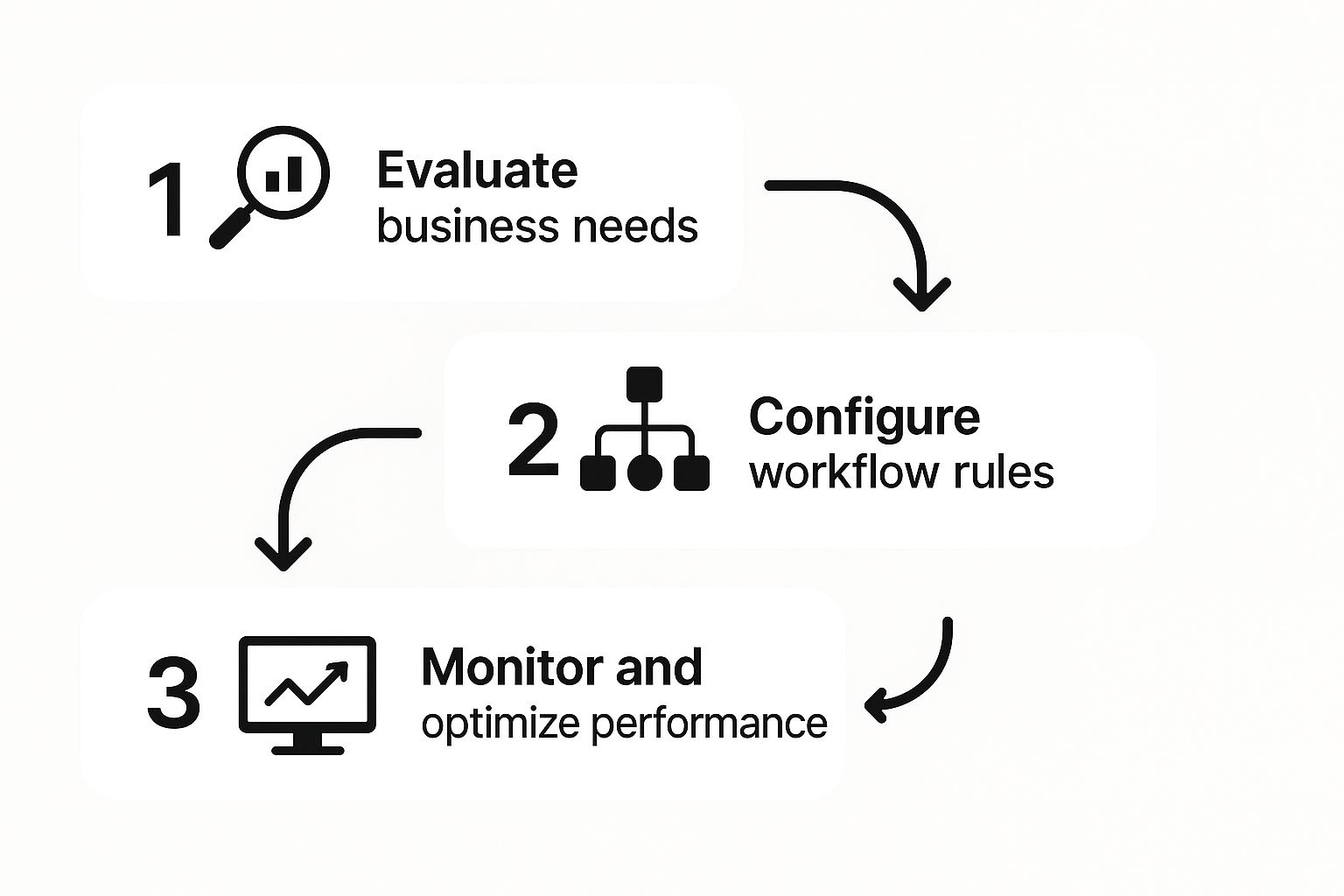
Trigger Event: A new user signs up.
This is where it all begins. Most workflow automation SaaS platforms can connect directly to your user database, your signup form, or even your payment processor like Stripe. When that “new user” record is created, the automation wakes up.
Action 1 (Immediate): Send the first welcome email.
This one is simple. The email is pretty generic and goes to everyone who signs up. It just confirms their account is active and points them to key resources, like the help center.
Conditional Logic: Here’s where we get smart.
We introduce a fork in the road based on the user’s plan. The system checks a data field, let’s say user_plan.
- IF
user_planequals “Pro,” THEN they go down the advanced onboarding path. - ELSE IF
user_planequals “Free,” THEN they get the standard onboarding.
This simple bit of logic is where the real power lies. It lets you personalize at scale—something that’s impossible to manage by hand once you have more than a few new users joining each day.
Path 1 Actions (The Pro Plan User):
- Wait for 24 hours. This gives the user some breathing room to explore on their own.
- Send the “Advanced Features” email. This email highlights the premium features they’re paying for.
- Create a task in our CRM. This automatically flags a customer success manager to schedule a personal welcome call.
Path 2 Actions (The Free Plan User):
- Wait for 48 hours. A slightly longer delay is fine here.
- Send the “Getting Started” email. This message focuses on the core features and how to get that “aha!” moment from the free version.
By breaking down a common business need into these clear steps, you can see how workflow automation for SaaS turns a manual checklist into a self-running system. This specific playbook saves hours, eliminates human error, and gives every new customer a much better, more relevant experience.
How to Scale and Optimize Your Automations

Getting your first automated workflow up and running is a fantastic milestone. Seriously, pop the confetti. But that’s just the beginning. The real magic, the kind that truly transforms your operations, happens when you start to scale and constantly fine-tune those automations. One workflow is a neat trick; a whole library of optimized ones is a powerful operational system.
But here’s the catch: as you build out more automations, things can get tangled up incredibly fast. That simple, elegant process you created a few months ago can suddenly break, become inefficient, or just plain outdated. To sidestep this kind of chaos, you need a solid game plan for managing, monitoring, and improving every automation you build.
Establish Clear Ownership and Documentation
Let’s get one thing straight: every single workflow needs a dedicated owner. This isn’t a task for a committee. You need one person who is accountable for that automation’s health and performance. When a workflow inevitably fails—and it will, maybe because of a third-party API update or a change in your own process—everyone needs to know exactly who to ping. No confusion, no finger-pointing.
Just as important as ownership is documentation. I know, I know—it sounds like a chore. But it doesn’t have to be a 50-page novel. A simple entry in your company wiki or a shared document is all you need. Just cover the basics:
- What it does: A quick, plain-English summary of its purpose.
- The trigger: What specific event kicks off the automation?
- Key logic: Are there any important “if this, then that” conditions or business rules?
- Connected apps: List all the software tools it touches.
This simple record keeps your automations from becoming mysterious black boxes that only one person on the team understands.
An undocumented workflow is a ticking time bomb of technical debt. Trust me, the five minutes you spend jotting down notes today will save you hours of painful reverse-engineering when something breaks six months from now.
Monitor Performance and Track Key Metrics
You can’t fix what you can’t see. For any workflow automation SaaS you’re using, setting up some form of monitoring is non-negotiable. Most platforms give you built-in dashboards to track successes and failures, which is great, but don’t stop there. You need to connect these operational stats to real business metrics.
Your ultimate goal here is to prove the value of what you’re building. You need to show how automation is making a tangible difference. A few key metrics I always keep an eye on are:
- Time Saved: Estimate the manual hours each workflow saves the team every week or month.
- Error Rate Reduction: How have mistakes decreased since you automated the process?
- Cost Avoidance: Putting a dollar value on these efficiency gains is crucial for effective SaaS cost optimization.
- Workflow Success Rate: What percentage of your automations run smoothly without errors? If this number starts to dip, it’s your first warning sign that something’s wrong.
Tracking these numbers does two things. First, it helps you spot brewing problems before they snowball and affect your customers. Second, it gives you the hard data you need to build a rock-solid case for investing even more in automation. It shifts the conversation from automation being a “nice-to-have” tech project to a core driver of business growth and efficiency.
Even with a solid plan, bringing a workflow automation SaaS platform into the mix naturally raises some questions. I’ve seen teams get stuck on perfectly valid concerns about security, getting people to actually use the new tools, and proving it was all worth it. Let’s walk through some of the most common questions that pop up.
Security is almost always the first thing on everyone’s mind. How safe is it, really, to let an outside tool connect to your most sensitive systems, like your CRM or customer database? It’s a critical question, and you’re right to ask it.
Any automation platform worth its salt invests a ton in security. They use encryption for data flying back and forth and for data just sitting there. They also go through rigorous third-party audits to get certifications like SOC 2 and GDPR. But it’s not all on them—your team has a big part to play.
Expert Tip: Live by the principle of least privilege. When you connect an app, only grant the automation tool the exact permissions it needs to do its job. Don’t just hand over the admin keys unless it’s absolutely necessary for a specific workflow.
This isn’t just a good idea; it’s a cornerstone of any smart security strategy. By limiting access, you shrink your potential risk, which is a key part of good SaaS risk management.
How Do We Encourage Team Adoption?
Another big hurdle is getting your team to buy in. You can design the most elegant automation on the planet, but it’s completely useless if no one uses or trusts it. The trick here is to start small and solve a real, nagging problem.
Don’t try to automate a massive, mission-critical process right out of the gate. Find a small, tedious task that everyone on the team hates doing. That’s your first target.
- Show, Don’t Just Tell: Build a simple workflow and walk through how it saves a colleague 30 minutes every single day. Seeing is believing.
- Create Champions: Identify a couple of people on your team who are excited about this. Give them the reins and let them become your internal advocates.
- Provide Simple Training: A quick lunch-and-learn can do wonders. Show everyone how the platform works and just how easy it is to get started.
Measuring the True Return on Investment
Finally, the big one: how do you prove this is actually working? Your leadership team will want to see hard numbers, not just anecdotes about “being more efficient.” You need to tie your automation work directly to business results.
Start by tracking a few key metrics before and after you roll out an automation:
- Hours Saved Per Month: Add up the manual time you’ve eliminated.
- Reduction in Error Rates: Count how many fewer mistakes are made in a process once the robots take over.
- Process Cycle Time: Measure how long a task takes from start to finish. You want to see that number go down.
When you can put numbers to it, the entire conversation changes. Automation is no longer viewed as just another expense; it becomes a powerful tool for driving real profitability and growth.
We’ve put together a quick FAQ table to answer a few more common questions that often come up.
Frequently Asked Questions About Workflow Automation SaaS
| Question | Answer |
|---|---|
| What’s the first step to get started? | Start by identifying a small, repetitive, and low-risk task. Think about daily or weekly reports, data entry, or simple notifications. This builds confidence and momentum. |
| How much technical skill is needed? | Modern no-code/low-code platforms like Zapier or Make are designed for non-developers. If you can understand “if this, then that” logic, you can build powerful workflows. |
| Can automation handle complex decisions? | Yes, but start simple. Advanced workflows can include conditional logic, filters, and routing, but it’s best to master the basics before tackling highly complex, multi-step processes. |
| Is it expensive? | It varies. Many platforms offer free or low-cost starter plans. The goal is for the value (time saved, errors reduced) to far exceed the monthly subscription cost. |
Hopefully, these answers give you a clearer picture of how to approach workflow automation successfully.
Ready to implement battle-tested automation playbooks in your business? SaaS Operations provides the templates and SOPs you need to streamline processes and accelerate growth. Get started at https://saasoperations.com.