
SaaS cost optimization isn’t just about slashing budgets; it’s about being strategic. It’s the process of taking a hard look at all your software subscriptions, figuring out what’s actually providing value, and cutting the waste. Think of it as ensuring every dollar you spend on software is actively helping you hit your business goals.
Uncovering the Hidden Costs in Your SaaS Stack

Before you can rein in spending, you need a clear picture of where your money is going. For most companies, the SaaS budget is a tangled web of recurring charges, forgotten free trials that turned into paid subscriptions, and apps that do pretty much the same thing. Those “small” monthly fees add up, quickly snowballing into a major annual expense if you’re not paying attention.
The truth is, software has become a core part of how we all work. It’s so integrated that by 2025, companies are on track to spend up to $3,500 per employee on SaaS tools each year. With total global spending projected to hit a staggering $300 billion, the pressure to get these costs under control is real. In fact, 42% of organizations are already actively working to reduce their software spend. You can dig deeper into these trends in the latest State of SaaS 2025 report.
The Usual Suspects of SaaS Overspending
So, where does all this waste come from? It’s almost never one big, obvious mistake. Instead, it’s a slow bleed from a handful of common issues that are easy to miss.
I’ve seen these pop up time and time again:
- Redundant Applications: This is a classic. Marketing buys Asana for project management, Engineering is on Jira, and Sales uses Trello. They all solve a similar problem, but because the purchases happen in silos, you end up paying for three tools instead of standardizing on one.
- Abandoned Subscriptions: I call these “zombie” accounts. An employee signs up for a tool, maybe for a specific project, and then leaves the company. But the subscription is on auto-renew, so that $49 a month just keeps charging, even though no one has logged in for a year. It’s pure budget drain.
- Underutilized Licenses: Paying for 100 seats when only 60 people are actually using the software is incredibly common. It’s especially bad with premium plans, where you’re paying a premium for advanced features that most of your team never even touches.
The Shadow IT Problem
One of the biggest hurdles in SaaS cost optimization is something we call “shadow IT.” This is any software that employees use without official approval from IT or Finance. It usually starts with good intentions—someone finds a tool that makes their job easier, expenses it on a company card, and gets to work.
While it solves an immediate need for that employee, it creates huge problems for the business. Shadow IT means you have:
- Zero visibility into your true software spending.
- Major security and compliance blind spots.
- No leverage to negotiate volume discounts because you don’t even know what’s being bought.
To help you get started, here’s a quick look at the most common cost traps I’ve encountered and the first thing you should do when you spot them.
Common SaaS Cost Traps and How to Spot Them
| Cost Trap | Description | Initial Action |
|---|---|---|
| Redundant Tools | Multiple apps with overlapping functionality purchased by different teams (e.g., three different project management tools). | Create a master list of all software and categorize each tool by its primary function. Look for overlaps. |
| Zombie Accounts | Active subscriptions tied to former employees or completed projects that are no longer in use. | Cross-reference your employee directory with user lists for each SaaS tool. Flag any accounts belonging to ex-employees. |
| Underutilized Licenses | Paying for more licenses (seats) than you have active users, or paying for premium features nobody uses. | Check the usage data or admin dashboard for each tool. Look for users who haven’t logged in for 90+ days. |
| Shadow IT | Software purchased and used by employees without IT approval, often via expense reports. | Scan through company credit card statements and expense reports for recurring software charges you don’t recognize. |
This table is just a starting point, but it highlights how a simple audit can immediately bring costly issues to light.
Key Takeaway: You can’t optimize what you can’t see. The absolute first step is getting a complete inventory of every single piece of software being used in your company.
A full-blown SaaS audit is what brings these hidden costs out of the shadows. It gives you a single source of truth—a master list of every tool, who owns it, what it costs, and when it renews. This list is the foundation for every smart cost-saving decision you’ll make from here on out.
How to Conduct a Thorough SaaS Audit
The first real step in getting your SaaS spending under control is building a complete, accurate inventory of every single app your business uses. I’m not just talking about the big, obvious tools your finance team pays for once a year. This is about a deep, investigative dive to uncover every subscription, especially the hidden ones quietly draining your budget. You need to establish a single source of truth that will drive every decision you make from here on out.
Think of this audit as more than just a spreadsheet. It’s a systematic process of discovery, blending a bit of financial forensics with direct feedback from your employees. If you skip this foundational work, you’re just guessing where your money is going.
Digging into Financial Records
Your company’s financial records are the most reliable place to start mapping your true SaaS footprint. It’s amazing how often shadow IT hides in plain sight on credit card statements and expense reports.
Get together with your finance or accounting team and pull all transaction data from the last 12 months. You’re hunting for any recurring charges from software vendors.
- Company Credit Cards: Scan every statement for monthly or annual charges from familiar names like Adobe or Slack, but also keep an eye out for less obvious tech companies.
- Expense Reimbursements: Go through employee expense reports. That one-off $50 charge for a niche tool could easily be a forgotten subscription on auto-renew.
- Accounts Payable: Review the invoices paid directly to vendors. This is where you’ll find the larger enterprise contracts, often managed by department heads and not centrally tracked.
This financial deep dive almost always uncovers subscriptions no one knew existed. I once worked with a company that found three separate teams were all expensing the same premium survey tool, costing them thousands in redundant spending each year. It happens more than you think.
Involving Your Team with Targeted Surveys
While your financial records tell you what you’re paying for, they don’t tell you why or if a tool is still delivering value. That’s where your people come in. A quick, targeted survey is the best way to get this information. The goal isn’t to create a long, tedious questionnaire but to ask a few pointed questions.
Keep your survey short and focused. Ask things like:
- What SaaS tools do you use every week to do your job?
- Which of these tools are absolutely critical for you to succeed in your role?
- Are there any tools you have access to but rarely or never use?
This approach does two things at once: it helps you identify the high-value apps you can’t live without and quickly flags licenses that can be reallocated or canceled. For a more structured approach, you can find great resources out there, like this comprehensive SaaS audit checklist.
Expert Insight: It’s crucial to frame your survey as an effort to ensure everyone has the best tools for their job, not as a cost-cutting witch hunt. When employees feel like they are part of the solution, they’re far more likely to give you honest and helpful feedback.
Recent data really underscores how complex this has become. One industry survey found that while companies now average 106 different SaaS apps, the rate of consolidation has slowed to just 5% year-over-year. This tells me that after making the easy cuts, many organizations get stuck. With budget pressures and underused apps cited as top concerns, and shadow IT worrying nearly 60% of IT professionals, a thorough audit is more critical than ever.
The simple flow below shows how you can turn your audit findings into real action.
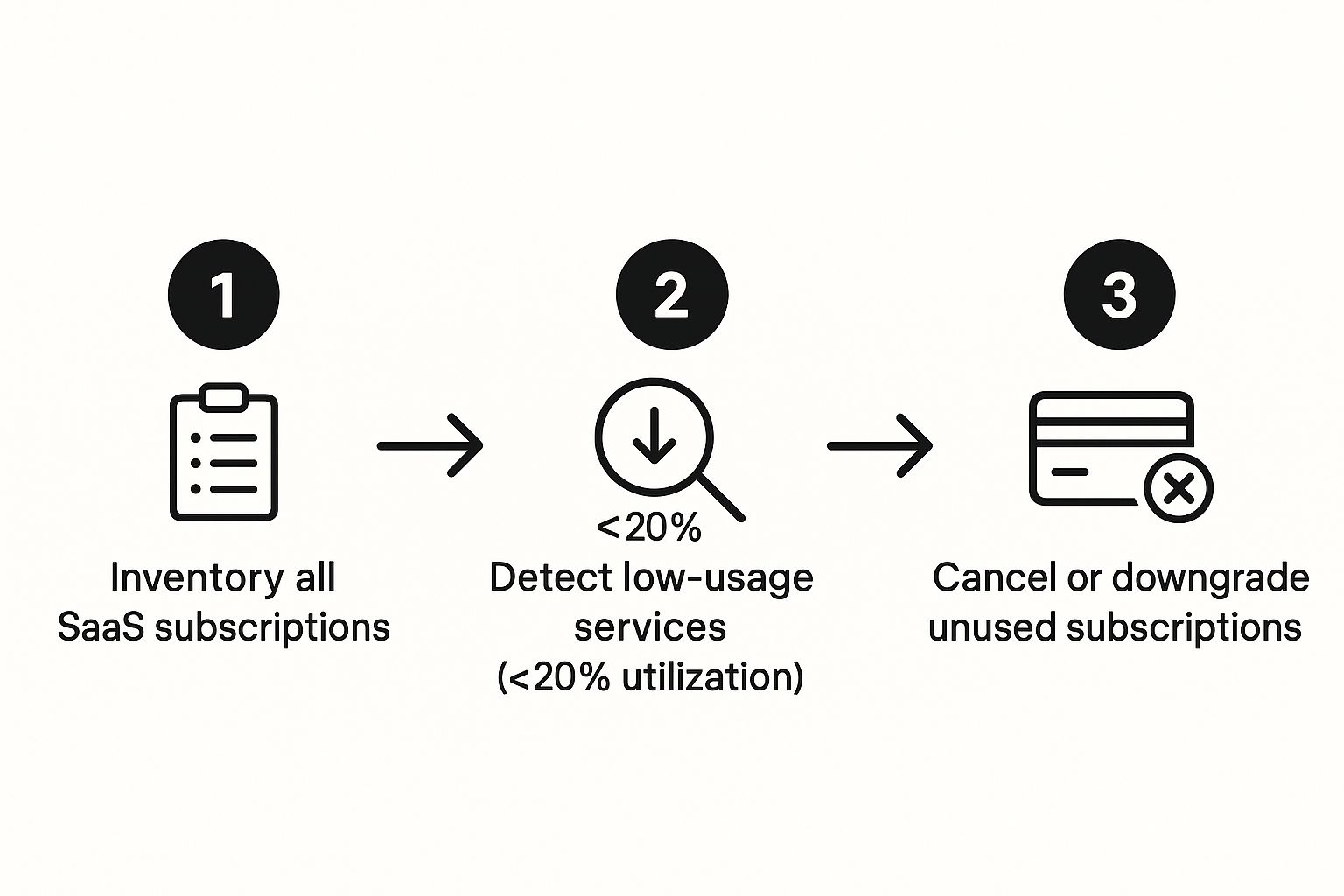
This process makes it clear: inventorying your stack is the essential first step toward making smart decisions about what to keep, cancel, or downgrade.
Creating Your Centralized SaaS Inventory
As all this information flows in from finance and your team, you need a central place to document it. This will become your command center for SaaS cost optimization.
For every single application you uncover, log these critical details:
- Application Name
- Primary Function (e.g., Project Management, CRM, Design)
- Department/Team Owner
- Number of Licenses/Seats
- Total Annual/Monthly Cost
- Per-User Cost
- Contract Renewal Date
- Contract Owner
Having all this data in one place is a game-changer. You can instantly see renewal deadlines, spot redundant tools, and understand the true cost of every app. Just remember, this inventory isn’t a one-time project. It’s a living document that needs to be updated regularly to prevent SaaS sprawl from creeping back in.
Digging into Usage Data to Find the Waste

Alright, you’ve got your master list of every app your company pays for. That’s a huge first step. But the real detective work is just getting started. Knowing what you have is one thing; knowing how it’s actually being used is where you find the real savings.
This is where you move from simple inventory to true SaaS cost optimization. You’ll be amazed at the gap between what people think they need and what they truly use day-to-day. The data you uncover here is your best weapon for cutting costs without hurting productivity.
Spotting Underused and Abandoned Licenses
The most obvious money pit? Paying for software that’s collecting dust. We call these “zombie licenses”—active subscriptions that are effectively dead. Hunting these down is the low-hanging fruit of your entire optimization effort, and it’s surprisingly easy to find.
Your first stop should be the admin dashboard of each of your major SaaS platforms. Most will give you some form of analytics on user activity.
Here’s what I always look for:
- Last Login Date: This is the big one. If a user hasn’t logged in for over 90 days, that’s a huge red flag. That license is a prime candidate to be shut down or reassigned to a new hire.
- Zero Activity: Some people log in but do absolutely nothing. Their account shows no new projects, no sent messages, no reports pulled. It’s an active license in name only.
- Former Employees: This happens more than you’d think. Cross-reference your active user lists with HR’s roster of former employees. It’s shockingly common to find licenses still active (and being paid for) months after someone has left the company.
This isn’t just about saving a few bucks; it’s a major security risk. Those inactive accounts are open doors for potential trouble. Managing this overlap between cost and security is a core part of responsible IT management. If you want to dive deeper, our guide on SaaS risk management is a great resource.
Are You Paying for Features No One Uses?
Beyond totally abandoned accounts lies a more subtle kind of waste: paying for premium features your teams never even touch. It’s so easy to just sign up for the “Enterprise” plan, thinking you need all the bells and whistles. But often, you don’t.
I once worked with a company whose marketing team had a top-tier subscription to a project management tool. They were paying a premium for advanced Gantt charts and resource planning features, but a quick look at their activity showed they only ever used the simple Kanban boards. They could have gotten the exact same value from a plan that cost 60% less.
My Pro Tip: Don’t just ask if a tool is being used. Ask how. Sit down with team leads and the people who use the software every day. Ask them what features they can’t live without. You’ll likely discover that 80% of the value your team gets comes from just 20% of the features—many of which are probably available on a cheaper tier.
Using Data to Win Over Department Heads
Walking up to a department head and telling them you want to cut one of their tools can feel… tense. Nobody likes having things taken away. This is where your usage data becomes your greatest asset.
Instead of leading with the cut, frame the conversation around making their budget work smarter for them.
Don’t say this: “Your team isn’t using this tool, so we’re cutting it to save money.”
Try this instead: “I was looking at the usage for Tool X and noticed only three people on your team have logged in this quarter. I was wondering if we could accomplish the same thing with Asana, which we already have. We could take the money we save and put it toward that new design tool you were asking for.”
When you bring objective data to the table, the conversation shifts. You’re no longer the budget police. You’re a strategic partner helping them get more out of their resources. This small change in approach is how you build a company-wide culture of cost-consciousness.
Strategies for Smarter Contract Negotiations
Alright, you’ve done the hard work. You have a full inventory of your SaaS tools and, more importantly, you know exactly who is using what. This is where things get interesting. You’re no longer just a buyer accepting the price on the screen; you’re in the driver’s seat.
This is the point where SaaS cost optimization stops being about discovery and starts being about action. It’s time to stop letting contracts auto-renew at sticker price and start negotiating like you mean business. The goal isn’t just to get a cheaper bill—it’s about getting the right terms and value for your team.
Create a Consolidation Plan
One of the biggest cards you can play in a negotiation is consolidation. Your software audit probably turned up a few redundancies—think three different project management tools for three different teams. This isn’t just wasted money; it’s a golden opportunity.
First, map out where these overlaps happen. Figure out which tool really gives you the best bang for your buck across the entire company, considering features, how well it’s been adopted, and price. For example, maybe Marketing loves Asana, Engineering lives in Jira, and another small team is using Trello. It’s time to ask the tough questions. Could Jira be configured to work for marketing workflows? Or would it be smarter to move everyone to an enterprise Asana plan?
Here’s a real-world example: I worked with a mid-sized tech company that was paying for both Slack and Microsoft Teams. When we dug into the data, we found that while the engineers were die-hard Slack fans, almost everyone else was already on Teams for video calls and file sharing. We put together a straightforward migration plan, shifted everyone over to Teams, and cut the entire Slack bill. That move alone saved them over $50,000 a year.
When you walk into a negotiation with a clear plan to bring more users to a single platform, you’re not just asking for a discount—you’re offering them more business.
Leverage Usage Data for Better Pricing
Never, ever walk into a renewal discussion without your usage data. It’s your single most powerful piece of evidence. If a vendor sends you a quote for 500 licenses, but your data clearly shows only 350 people have even logged in over the last six months, you’ve got an open-and-shut case for a better price.
Don’t just tell them—show them. Lay out the numbers on underutilized seats or those expensive premium features nobody ever touches.
Here’s how those conversations might sound:
- For downgrading tiers: “We love the product, but our data shows the team primarily uses the core Kanban features. The advanced reporting in our current premium plan just isn’t getting used. We’d like to talk about moving to your standard tier.”
- For reducing licenses: “We’re ready to renew, but our records show 40 of our 200 licenses have been inactive for months. We need to right-size this contract to reflect our actual team of 160 active users.”
This approach changes the entire dynamic. The conversation is no longer about feelings or vague needs; it’s about cold, hard facts. It makes it incredibly difficult for a sales rep to justify charging you for shelfware and signals that you’re a sharp buyer, which often gets you their best offer much faster.
Time Your Conversations for Maximum Impact
In any negotiation, timing is everything. If you wait until the renewal notice hits your inbox a week before the deadline, you’ve already lost. The vendor holds all the cards.
Instead, you need to be proactive. Kick off the conversation 90 to 120 days before the contract is set to expire. This gives you plenty of breathing room to explore alternatives, maybe even run a pilot with a competitor, and negotiate without the pressure of a looming deadline. When a vendor knows you have a viable Plan B, they suddenly become much more flexible on price and terms.
This proactive approach is also essential for understanding how your vendor relationships impact your financial health. Keeping an eye on metrics like your annual recurring revenue (ARR) gives you the context needed to make these spending decisions. If you want to dive deeper, you can learn more about how to use this metric in our guide on understanding annual recurring revenue.
Bundle Services for Enterprise Discounts
Finally, don’t overlook the power of bundling. If you’re already using a provider for one key product, find out what else they sell. Big vendors like Microsoft, Google, or Adobe are almost always willing to cut a deal for customers who go deeper into their ecosystem.
For instance, if your sales team runs on Salesforce, you could likely get a significant discount by adding their marketing automation or customer service products. This move does two things: it simplifies your tech stack by reducing the number of vendors you have to manage, and it makes you a much more valuable customer. That added value gives you more leverage to ask for better pricing, dedicated support, and more flexible terms across the board.
Building a Proactive SaaS Management Framework

Let’s be honest: auditing your SaaS stack is a lot of work. The last thing you want is to have to do it all over again in six months. That’s why the real win isn’t just cutting costs today; it’s building a system that keeps those costs in check for good.
Without a solid framework, the same old problems—shadow IT, duplicate apps, and wasted money—will inevitably creep back in. This isn’t about a one-time project. It’s about creating a permanent, cost-conscious discipline within your business.
Establish a Formal Procurement Process
The most powerful way to stop SaaS sprawl is to control how new software gets in the door. A formal procurement process is your first line of defense, and it doesn’t have to be complicated or slow things down. A simple, clear workflow is all you need.
So, when a team member wants to buy a new tool, their request should automatically kick off a quick review. This forces everyone to pause and think strategically by asking:
- What’s the goal? What specific business problem will this solve, and what do we expect to get out of it?
- Do we have this already? Is there another tool in our stack that does the same thing?
- Is it secure? Does this app meet our company’s standards for data security and compliance?
This checkpoint isn’t about creating red tape. It’s about preventing impulsive, decentralized buying and making sure every new subscription has a clear purpose and a documented owner from day one.
Assign Clear Ownership and Accountability
Every single application in your stack needs a name next to it. That name, usually a team lead or department head, becomes the designated owner responsible for that tool’s budget, usage, and overall value.
Assigning ownership is a game-changer. It creates a powerful sense of accountability because now, someone is directly answerable for the tool’s cost and performance. If usage drops, you know exactly who to talk to.
It also makes for smarter decisions. When a budget owner has to justify an expense, they’re far more likely to question its real value. This structure simplifies everything, especially when it’s time to negotiate renewals.
This is the heart of what’s known as SaaS Operations Management, which provides the playbooks for managing a tech stack effectively.
A good SaaS management platform can be your command center for this, giving you a single dashboard to track every app, its cost, and its owner.
Implement Regular Cadence Reviews
Your business isn’t static, and neither is your SaaS stack. To keep it lean and effective, you have to build regular reviews into your operational rhythm. This is how SaaS cost optimization becomes second nature.
Think of your SaaS stack like a garden. You can’t just weed it once and walk away. It needs consistent attention to prevent waste from growing back.
I recommend scheduling these reviews to sync with your existing business cycles:
- Quarterly Check-ins: These are quick meetings with department heads to review their apps. You’ll discuss usage data, any upcoming needs, and flag tools that are no longer essential.
- Annual Deep Dive: Once a year, right before budget season, conduct a full-scale audit. This ensures your software spending for the next year is grounded in hard data, not guesswork.
This simple cycle transforms SaaS management from a frantic fire drill into a predictable, strategic function. It guarantees your optimization efforts have a lasting impact and helps build a culture of cost-awareness across the entire company.
Frequently Asked Questions About SaaS Cost Optimization
Starting a SaaS cost optimization project can feel like opening a can of worms. It’s a big deal that pulls in everyone from IT and Finance to the teams using the software every day. Let’s walk through some of the most common questions I hear and get you some clear, practical answers so you can move forward.
How Often Should We Really Be Doing a SaaS Audit?
Honestly, a full-blown audit should happen at least annually. But if your company is growing fast or you’re a larger organization, doing this twice a year, or even quarterly, is a much smarter move. The real goal is to find a consistent rhythm that works for you.
Regular check-ins are what stop shadow IT and those forgotten “zombie” licenses from piling up. A great habit to get into is tying smaller, mini-audits to your regular budget planning cycles. This keeps your software spending directly in line with your current business goals and financial plans, turning a massive annual headache into a manageable, ongoing process.
What’s the Best Way to Handle Pushback When We Want to Cut a Tool?
Look, people don’t like change. When you try to take away a tool, the resistance usually comes from a real fear of disrupting their work or a genuine belief that the software is critical. The best way forward is to be transparent, data-driven, and collaborative.
First, bring the data to the conversation. Don’t just say it’s not being used; show them. Present clear metrics that reveal the tool is underutilized or that its main purpose is already covered by another platform you’re paying for.
Next, just listen. Ask them to show you the exact workflow they’re worried about. Sometimes, just understanding their specific use case is half the battle.
Finally, come prepared with a solution. Offer a clear alternative and a simple migration plan. Often, a feature that’s already sitting inside a powerhouse tool like Google Workspace or Microsoft 365 can easily replace a niche app. Frame the change not as taking something away, but as simplifying everyone’s life. A small pilot program with the replacement tool can also do wonders for getting people on board.
Are SaaS Management Platforms Actually Worth the Money?
For most companies with over 50 employees or a sprawling software stack, the answer is an emphatic yes. Sure, you can try to juggle everything with spreadsheets and elbow grease, but a dedicated platform almost always delivers a solid ROI.
Think about what these platforms automate:
- Discovery: They automatically sniff out every SaaS subscription, including the ones your IT team doesn’t even know about.
- Usage Tracking: You get real-time data on who is actually logging in and using the software.
- Spend Monitoring: All your cost data is pulled into one central dashboard.
- Renewal Alerts: You get a heads-up before a contract renews, so you’re never caught off guard.
The time your IT and Finance teams save, plus the direct cost savings from cutting waste, typically pays for the platform’s subscription fee and then some. It shifts your entire approach from being reactive to proactive.
What’s the Single Biggest Mistake Companies Make?
The biggest pitfall I see is treating SaaS optimization as a one-and-done, IT-led project that’s only about slashing the budget. This narrow focus is a recipe for disaster.
True optimization is an ongoing business strategy. It requires a partnership between IT, Finance, and department leaders. If you just start cutting tools without understanding their business value or how they impact productivity, you can do more harm than good. You risk tanking morale and might even hurt your bottom line.
The most successful companies focus on maximizing the value of their software, not just minimizing the cost. This means getting the right tools to the right people and making sure they’re actually used well. This mindset also boosts user satisfaction, which is a huge piece of the puzzle for improving your overall customer retention in SaaS.
At SaaS Operations, we provide the proven playbooks and templates you need to run a more effective and efficient business. Our battle-tested frameworks help you implement processes for everything from cost optimization to people management, saving you time and accelerating growth. Get started with our proven playbooks today.