How to Run Effective Meetings: Tips to Get Results
 Published By: Alex
September 2, 2025
Published By: Alex
September 2, 2025
If you want to run meetings that actually get things done, you need to master three things: strategic preparation, focused execution, and accountable follow-up. It's that simple. Nailing these turns pointless calendar blocks into productive sessions that push work forward and, more importantly, respect everyone's time.
The True Cost of Ineffective Meetings
We’ve all been there. The meeting invite with no agenda. The discussion that goes completely off the rails. The hour-long call that could have been a two-sentence email. These aren't just minor annoyances; they're a massive drain on productivity, morale, and your company's bottom line. A broken meeting culture is one of the most common—and most damaging—problems in the SaaS world.

The financial hit is shocking. Bad meetings don't just cost you a few hours of salary; they create a ripple effect of disengagement and delayed projects. Research shows that ineffective meetings cost the U.S. economy a staggering $37 billion every single year. That's a huge loss of resources, driven by workers wasting an average of 91 minutes a day on meetings or tasks that have nothing to do with their actual jobs.
Recognizing a Broken Meeting Culture
So, how do you know if your company is bleeding money and morale in endless meetings? The signs are usually obvious once you start looking. The biggest red flag is the classic agenda-less invite that leaves everyone guessing what the meeting is even about.
Here are a few other tell-tale signs:
- Disengaged Attendees: Look around the room or at the grid of faces on your video call. If people are zoned out, typing away on other work, or completely silent, they’re not adding value.
- No Clear Outcomes: The meeting ends, and… what now? If you walk away without concrete next steps, clear owners, and firm deadlines, the conversation was likely a waste of time.
- The "Meeting After the Meeting": This is a classic. The real decisions get made in side chats after the official meeting ends because the right people weren't in the room or the discussion lacked focus.
These aren't just bad habits; they point to a fundamental breakdown in your operational process. For high-stakes conversations, like a quarterly business review template, a weak meeting culture just won't cut it. You need a structured, disciplined approach.
The most expensive meeting is the one that happens twice because the first one failed. When you fail to prepare, you are preparing to repeat yourself, wasting double the time and resources.
To help you get a clear picture of what good looks like, I've broken down the core principles of effective meetings into a simple framework.
The Three Pillars of Effective Meetings
This table summarizes the core principles we'll be diving into. Think of it as a quick-reference guide to transform your meetings from time-wasters into powerful tools for progress.
| Pillar | Core Principle | Key Actions |
|---|---|---|
| Strategic Preparation | No agenda, no meeting. Clarity is king. | Define a clear objective, build a focused agenda, and send out pre-read materials 24-48 hours in advance. |
| Focused Execution | Keep everyone on track and on time. | Assign a facilitator, stick to the agenda, and create a "parking lot" for off-topic ideas to be addressed later. |
| Accountable Follow-Up | A meeting without follow-up is just a conversation. | Send a recap email with clear action items, owners, and deadlines within 24 hours. Track progress publicly. |
Ultimately, running great meetings isn't just about being efficient. It's about building a culture that values everyone's contribution and respects their time. When you nail the preparation, execution, and follow-up, you stop treating meetings as an obligation and start using them as a powerful catalyst for getting real work done.
Preparing for Success Before You Hit Send
The fate of a meeting is usually sealed long before anyone dials in. A truly productive session isn't a matter of luck; it's the direct result of thoughtful, deliberate preparation. Without it, you're just hoping for the best. With it, you're engineering a successful outcome.
The absolute bedrock of good preparation is a solid agenda. I'm not talking about a simple list of topics, but a genuine roadmap for the conversation. This simple document provides structure and focus, preventing the meeting from spiraling into a time-wasting, aimless discussion.
Mastering the PAO Framework
To build an agenda that actually gets things done, I swear by the PAO framework: Purpose, Agenda, and Outcomes. It's a brilliantly simple model that forces you to clarify your goals before you ever click "send" on that calendar invite.
- Purpose: Nail this down in a single, clear sentence. Why does this meeting need to exist? Are you making a decision, brainstorming new ideas, or getting everyone aligned on a plan? If you can't state the purpose clearly, you probably don't need a meeting.
- Agenda: This is your list of discussion points or critical questions. The key here is to assign a time estimate to each item. This keeps the conversation moving and respects everyone's schedule.
- Outcomes: What tangible results will exist when this meeting is over? This could be a documented decision, a list of action items with owners, or a finalized project scope.
Using the PAO framework fundamentally shifts the mindset from just having a meeting to achieving something specific. That's the secret sauce.
This is a great place to start formalizing your processes. You can build this framework into your company's playbook by exploring our guide on creating a standard operating procedures template.
Building a Lean and Effective Attendee List
One of the quickest ways to derail a meeting is by inviting the whole company. The more people in the room (or on the call), the harder it is to have a focused discussion and land on a decision. The goal isn't to include everyone—it's to include only the right people.
Before adding someone to the invite list, run them through this simple filter:
- Is their specific input absolutely essential to get to the desired outcome?
- Are they a key decision-maker for the topics at hand?
- Will they be directly responsible for taking action on the decisions made?
If the answer to all three is a firm "no," they likely don't need to be there. An email summary after the fact is a much better use of their time. This is where solid internal communication best practices come into play, ensuring everyone stays in the loop without bogging down their calendars.
This graphic breaks down the simple but critical process of making sure the right people are in the room.
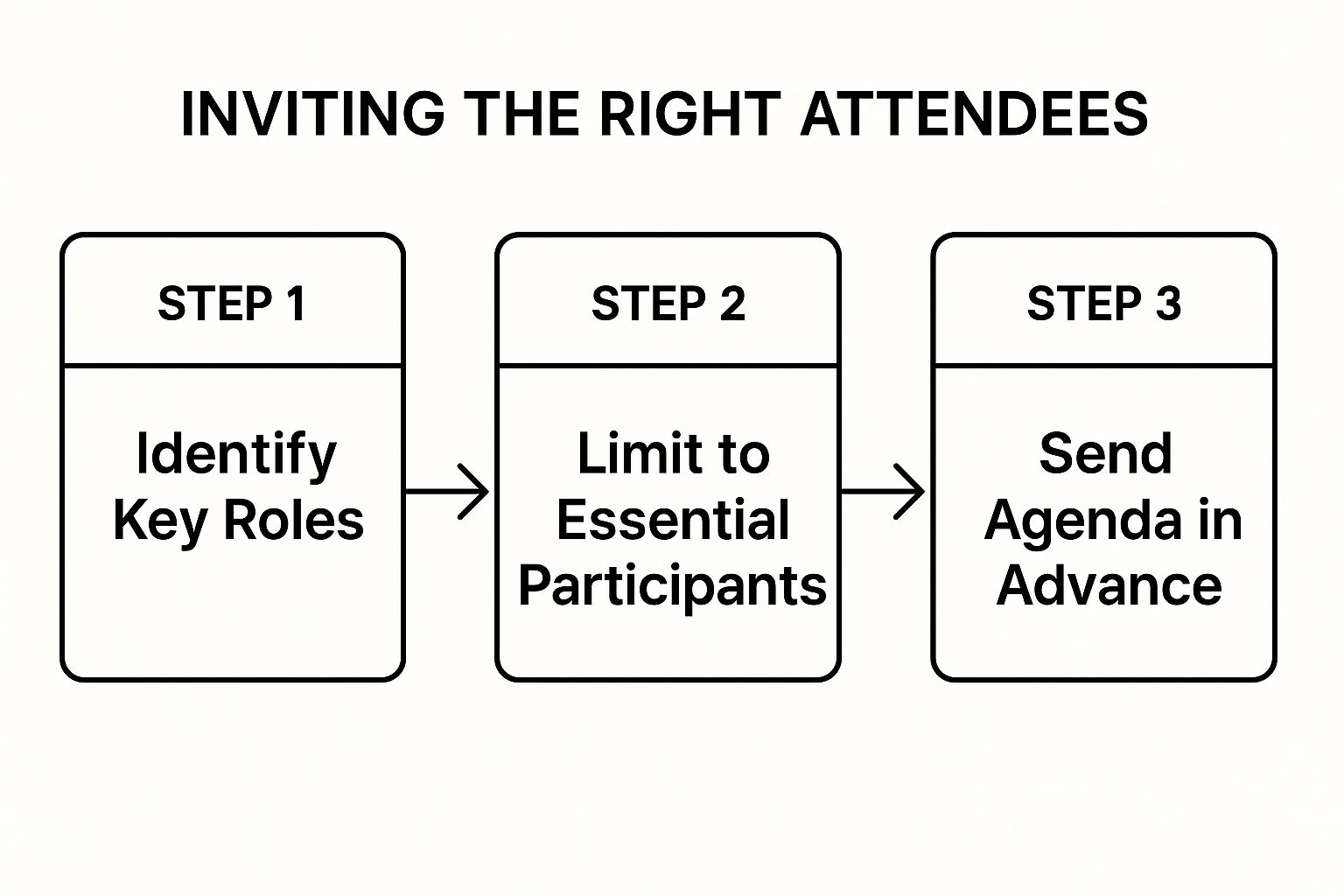
As you can see, a carefully curated invite list and advanced prep aren't just nice-to-haves; they are foundational steps for any meeting that's worth having.
My Pro Tip: Don't be afraid to use the 'optional' attendee status. It's a sign of respect. You're giving your colleagues the autonomy to decide if their attendance is truly the best use of their time, and you're trusting them to manage their own priorities.
The data on this is pretty damning. A shocking 64% of recurring meetings have no clear agenda, and 21% have one that’s so vague it’s useless. When you consider that employees spend an average of 392 hours a year in meetings, that lack of prep adds up to a colossal waste of time and money. It’s also wild that only 12.6% of invites are marked as 'optional'—a number that needs to be much, much higher.
Real-World Agenda Examples
Let's see what the PAO framework looks like in action for a couple of common SaaS scenarios. Notice how each one is designed to produce a result, not just to "talk about" something.
Example 1: Project Check-In
- Purpose: Review progress on the Q3 feature launch, tackle any blockers, and lock in the next two weeks of work.
- Agenda:
- Quick demo of the current build (10 min)
- Review key metrics against our forecast (5 min)
- Open floor to identify and solve blockers (10 min)
- Outcomes:
- A documented list of solutions for each blocker.
- The next two-week sprint priorities are confirmed and understood by all.
Example 2: Brainstorming Session
- Purpose: Generate three concrete, viable ideas for reducing friction in our user onboarding flow.
- Agenda:
- Recap of user feedback on the current onboarding (5 min)
- Silent idea generation on a digital whiteboard (10 min)
- Group discussion and clustering of similar ideas (15 min)
- Dot voting to pick the top three concepts (5 min)
- Outcomes:
- Three prioritized concepts for improving onboarding.
- An owner assigned to create a formal proposal for each concept.
As you can see, a well-built agenda is more than just a list—it's a powerful tool for facilitation. It sets clear expectations, keeps the conversation on track, and makes sure that when the meeting ends, you've actually accomplished something real.
Keeping Your Meeting From Going Off the Rails
You can do all the prep work in the world, but if the meeting itself derails, it's all for nothing. This is where your skill as a facilitator truly shines. It’s not about just starting the call; it's about steering the conversation, keeping the energy up, and making sure you walk away with what you came for.
A great facilitator sets the tone right from the start. Before jumping into the first agenda item, take just 60 seconds to reset the room. Briefly restate the meeting's purpose and the outcomes you’re aiming for. This simple act gets everyone focused and reminds them why they're taking time out of their day.
Guiding the Conversation with Confidence
One of the most powerful tools in a facilitator's belt is timeboxing. Your agenda should already have time slots for each topic, and your job is to gently enforce them. This isn't about being a drill sergeant; it's about showing respect for everyone's time and keeping the discussion tight.
When time is running out on a topic, give a heads-up. Something like, "We have about two minutes left on this. What’s the key takeaway or decision we need before moving on?" This creates a healthy sense of urgency and pushes the group toward a resolution.
Of course, conversations have a way of wandering. Your ability to politely redirect is a critical skill. When a new, unrelated idea pops up, don’t just shut it down. Acknowledge it and stick it in a "parking lot."
Parking Lot in Action: "That's a great point, Sarah. I don't want to lose that thought. Let's add it to our parking lot to tackle after this meeting so we can stay on track with our current goal."
This validates the person's contribution without derailing the meeting. The "parking lot" can just be a corner of your shared notes doc where you capture these valuable tangents for later. How you handle these moments often comes down to your personal approach; understanding your own leadership style in business management can make you a much more effective facilitator.
Making Sure Everyone Gets a Voice
In just about any meeting, you'll have a mix of dominant talkers and quieter thinkers. Your job is to create a space where everyone feels comfortable jumping in. If you notice one person is taking up all the oxygen, you need to step in.
Here’s how to handle a few common situations:
- The Over-Talker: To politely cut in, try, "Thanks for all that detail, Mike. I'd love to get some other perspectives in. Jane, what are your thoughts on this?" This shifts the spotlight without being confrontational.
- The Quiet Contributor: Actively ask for input from people who haven't spoken. A simple, "David, you've got a ton of experience here. What's your take?" is often all it takes to unlock incredibly valuable insights.
- The Discussion Loop: When you hear the same points being repeated, it's time to break the cycle. Reframe the problem by asking, "It feels like we're spinning our wheels. What's the smallest step we can agree on right now to move this forward?"
You're trying to build an environment where people aren't afraid to speak up. It’s no surprise that some studies show nearly 40% of people admit to dozing off in meetings—it's a sure sign of disengagement. Actively managing participation is your best weapon against it.
Capture Decisions and Actions as They Happen
A meeting’s impact disappears if no one remembers what was decided. Don't wait until the end to figure it out. Document decisions and action items in real-time using a shared document everyone can see.
When a decision is made, write it down. When a task is assigned, capture it immediately. I’ve found a simple framework works best.
A Clear Action Item Table
| Task | Owner | Due Date |
|---|---|---|
| Draft the proposal for the new onboarding flow | Alex | End of Day Friday |
| Pull the Q3 performance data for review | Chloe | By Wednesday's sync |
| Schedule the follow-up with the design team | Sam | Tomorrow (EOD) |
This little table creates instant clarity and accountability. Before you wrap up, take the last two minutes to review the decisions and action items out loud. Confirm the owner and the deadline for each one. This final check ensures everyone leaves on the same page, knowing exactly what comes next.
Turning Conversation Into Action After the Meeting
The single biggest mistake I see teams make is thinking the meeting is over when everyone hangs up. That couldn't be further from the truth. A meeting's value is zero—literally zero—if the conversation doesn't spark real, tangible progress. The follow-up is what separates a productive session from an hour of everyone’s time you just wasted.
Momentum is a fragile thing; it fades fast. That's why you have to get a concise, action-oriented summary out the door within a few hours. Not a few days. Honestly, waiting until the next morning is often too late. By then, the context is fuzzy and the sense of urgency is gone. Your goal isn't to write a novel, just a scannable recap that gets everyone on the same page.
The Simple Three-Part Summary
Your meeting summary doesn't need to be some elaborate document. In fact, simpler is almost always better. I've found the most effective recaps boil down to just three things.
- Decisions Made: What did we actually agree on? List the final decisions in plain language. This creates a record that prevents a week of "I thought we decided…" back-and-forths.
- Action Items: This is the most important part, period. For every task, you need three things: the specific action, an owner, and a due date. Miss one of those, and you’ve got a wish, not a task. Accountability is impossible without them.
- Key Takeaways: Briefly jot down any major insights or big-picture learnings. This is also a great spot to note any open questions that need to be revisited later.
This structure forces you to cut through the noise and highlight what actually matters. Anyone on the team should be able to scan it and know what's next in under 60 seconds.
From Follow-Up to Workflow
Okay, you've sent the summary email. Great. Now, get those action items out of everyone's inbox and into your team's actual workflow. This is where accountability truly happens. Trying to track tasks from an email chain is a surefire way to drop the ball.
Instead, immediately plug each action item into whatever project management tool your team lives in—Asana, Jira, Trello, you name it. When you create the task, make sure to drop a link back to the meeting notes for context. This creates a clean, closed loop where every task is visible, trackable, and tied directly back to the conversation that created it. To make sure you're capturing everything correctly in the first place, it's worth brushing up on some effective note-taking methods.
A task without a clear owner and a firm deadline is just a suggestion. True accountability begins the moment an action item is logged in a system everyone uses and trusts.
This whole process is a cornerstone of operational excellence. It's a discipline you can bake into a bigger framework, much like the one we detail in our guide to building a customer success playbook, where clear actions consistently drive measurable results.
Introducing the Meeting Scorecard
So, how do you know if your meetings are actually getting better? You can't just guess—you need a feedback loop. This is where the Meeting Scorecard comes in. It’s a dead-simple, powerful tool for driving continuous improvement. Think of it as a quick, anonymous survey you send out after recurring meetings to get candid feedback.
Your scorecard can be as simple as asking attendees to rate the meeting from 1-5 on a few key areas.
Sample Meeting Scorecard Questions:
- Clarity of Purpose: Was the goal of this meeting obvious from the start?
- Agenda Adherence: Did we stick to the agenda and stay on topic?
- Actionable Outcomes: Did we walk away with clear decisions and next steps?
Look at the data every quarter. You’ll start seeing patterns. Are your agendas consistently muddy? Do meetings always run long? This feedback is gold. It helps you pinpoint exactly where the process is breaking down so you can fix it. The goal isn't to be perfect overnight; it's to get a little bit better, every single week.
Nailing Remote and Hybrid Meetings
Running meetings with a mix of people in the office and others dialing in from home is a whole different ballgame. It's incredibly easy for your remote folks to feel like they're watching from the sidelines, which tanks engagement and creates a two-tiered experience. To get this right, you have to be deliberate about closing that gap between the physical conference room and the virtual attendees.

The first order of business is getting the tech right. This is about more than just sending out a Zoom link; it’s about creating a level playing field for participation. Think virtual whiteboards like Miro for brainstorming. This way, remote team members aren't just squinting at a physical board they can barely see—they're right there in the mix, adding their own ideas.
Breakout rooms are another game-changer. Use them to split up into smaller groups for deeper discussions. It’s the perfect way to give remote employees a chance to connect and speak up, something that’s tough to do when they're fighting for a sliver of airtime in a big group.
Taking on Proximity Bias
Proximity bias is the silent killer of good hybrid meetings. It's that unconscious pull to give more weight to the people physically in the room with you. It’s why side chats erupt in the conference room, leaving remote folks completely in the dark. To counter this, you have to adopt a remote-first mindset, even if you're sitting at the head of the table.
One of the most powerful moves I've seen is enforcing a "remote-first" speaking order. It's simple: when you move to a new agenda item, you intentionally ask the remote participants for their thoughts first.
By actively seeking out remote voices first, you send a clear signal that every perspective is valued equally, regardless of location. This small shift in facilitation can dramatically improve inclusion and the quality of your decisions.
Another fantastic tactic is to have everyone join the call from their own laptops, even the people in the office. This puts each person in their own square on the screen, instantly killing the "us vs. them" vibe. This is especially vital when bringing new people on board; as our guide on SaaS onboarding best practices points out, equal access from day one is non-negotiable.
Smarter Collaboration Through Technology
The tools we rely on are evolving beyond basic video calls. The real magic is in smart integration. Platforms like Zoom and Microsoft Teams are now connecting with workplace analytics tools, giving companies incredible data to manage their meeting spaces, both real and virtual. This trend makes one thing clear: data-driven insights are becoming central to running a tight ship in a mixed-work world.
At the end of the day, mastering the hybrid meeting comes down to empathy and a solid process. When you pair the right technology with inclusive facilitation, you create an environment where every single person can do their best work, no matter where they're logging in from.
Got Questions About Running Better Meetings? We've Got Answers.
Even when you have a great game plan, things can go sideways in a meeting. Let's tackle some of the most common questions I hear from SaaS leaders and get you some practical advice for those tricky, real-world moments.
How Long Should a Meeting Be?
Honestly? As short as possible.
Here’s a simple trick I swear by: default your calendar invites to 25 or 50 minutes. Ditching the standard 30 or 60-minute blocks works wonders.
First off, it forces you to be ruthless with your agenda and stick to what truly matters. Second, it gives everyone a much-needed buffer between calls. People can actually grab a coffee, stretch, or prep for their next conversation without feeling completely slammed.
If a topic really needs more time, just schedule a separate deep-dive session for it. Don’t let it bloat the original meeting.
What’s the Best Way to Handle Someone Who Derails Conversations?
Ah, the classic meeting hijacker. We've all been there. This situation calls for a gentle but firm touch. The goal is to acknowledge their point without letting the entire meeting go off the rails.
I find it helps to have a go-to phrase ready. Something simple and polite you can use every time.
For example: "That's an interesting point, Alex. To make sure we cover our main goal today, let's put that in the 'parking lot' and come back to it." This validates their idea but keeps you in control of the agenda. The "parking lot" is just a spot in your meeting notes where you capture these ideas to address later.
The art of great facilitation isn't about preventing tangents—it's about managing them. Acknowledge, park it, and move on. This keeps the meeting focused while making everyone feel heard.
How Do I Get People to Actually Read Pre-Meeting Materials?
If people show up unprepared, the meeting is dead on arrival. You can't just hope they'll do the pre-reading; you have to build it into the process.
Here are a couple of tactics that work like a charm:
- Be explicit in the invite. Add a clear line like, "Please review the attached doc before the call. We'll be starting with the assumption that everyone is up to speed."
- Kick off with a silent read. If you suspect people haven't done the prep, start the meeting with 5 minutes of silent reading time. It feels a bit strange at first, but it guarantees everyone starts on the same page.
If it keeps happening with the same person, it might be time for a quick one-on-one chat to figure out what's going on.
Is It Okay to Cancel an Unnecessary Meeting?
Yes! A thousand times, yes. Canceling a meeting that has no clear purpose is one of the biggest productivity hacks out there. It shows you respect everyone's time and helps build a culture where meetings are for action, not just for show.
When you do cancel, don't just hit delete. Send a quick note explaining why. Something like, "Canceling our sync for tomorrow. We sorted out the blocker over Slack. Great work, everyone!" People will love you for giving them back a chunk of their day.
Mastering these details is what separates good managers from great ones. For a much deeper look into the nuts and bolts, check out this comprehensive guide to running effective meetings.
At SaaS Operations, we build battle-tested playbooks and SOPs that help you create a more efficient business. It's time to stop wasting hours in bad meetings and start getting things done. Explore our frameworks today. https://saasoperations.com