10 Actionable Business Process Automation Examples for 2025
 Published By: Alex
August 30, 2025
Published By: Alex
August 30, 2025
Business process automation (BPA) is more than just a buzzword; it's a fundamental operational shift that allows SaaS companies to scale efficiently and predictably. While the concept is simple-using technology to perform repetitive, manual tasks-its practical application is what separates high-growth businesses from their competitors. Moving beyond theory is crucial. Instead of just talking about what automation can do, this article focuses on how it's done. We've curated a list of actionable business process automation examples that successful SaaS operators are implementing right now.
Each example is broken down into a replicable strategy, offering deep strategic analysis and specific tactical insights. You won't find generic success stories here. Instead, you'll discover the behind-the-scenes details on how to automate critical functions like customer onboarding, lead nurturing, and invoice processing. Understanding these use cases is the first step toward reclaiming valuable time and resources, allowing your team to focus on innovation and growth. To understand the profound impact, explore the key business process automation benefits that can transform SaaS operations. This guide provides the practical playbooks you need to turn automation from an abstract idea into a core part of your operational DNA.
1. Invoice Processing Automation
Manual invoice processing is a classic operational bottleneck. It’s slow, prone to human error, and drains valuable finance team resources. Invoice processing automation transforms this workflow by using technologies like Optical Character Recognition (OCR) and AI to digitize, validate, and route invoices automatically. This is one of the most impactful business process automation examples because it directly accelerates the procure-to-pay cycle and reduces operational costs.
Companies like Siemens have seen incredible results, cutting their invoice processing time from 20 days down to just 4. The system works by extracting key data (vendor name, PO number, line items, totals) from incoming invoices, whether they are digital or paper. It then performs a three-way match against the corresponding purchase order and goods receipt note.
How It Works: The Automated Workflow
The core of this automation is a clear, sequential process that eliminates manual checks and data entry. This system ensures accuracy and speed by validating information automatically at each stage.
The infographic below illustrates the typical three-step flow of an automated invoice processing system.
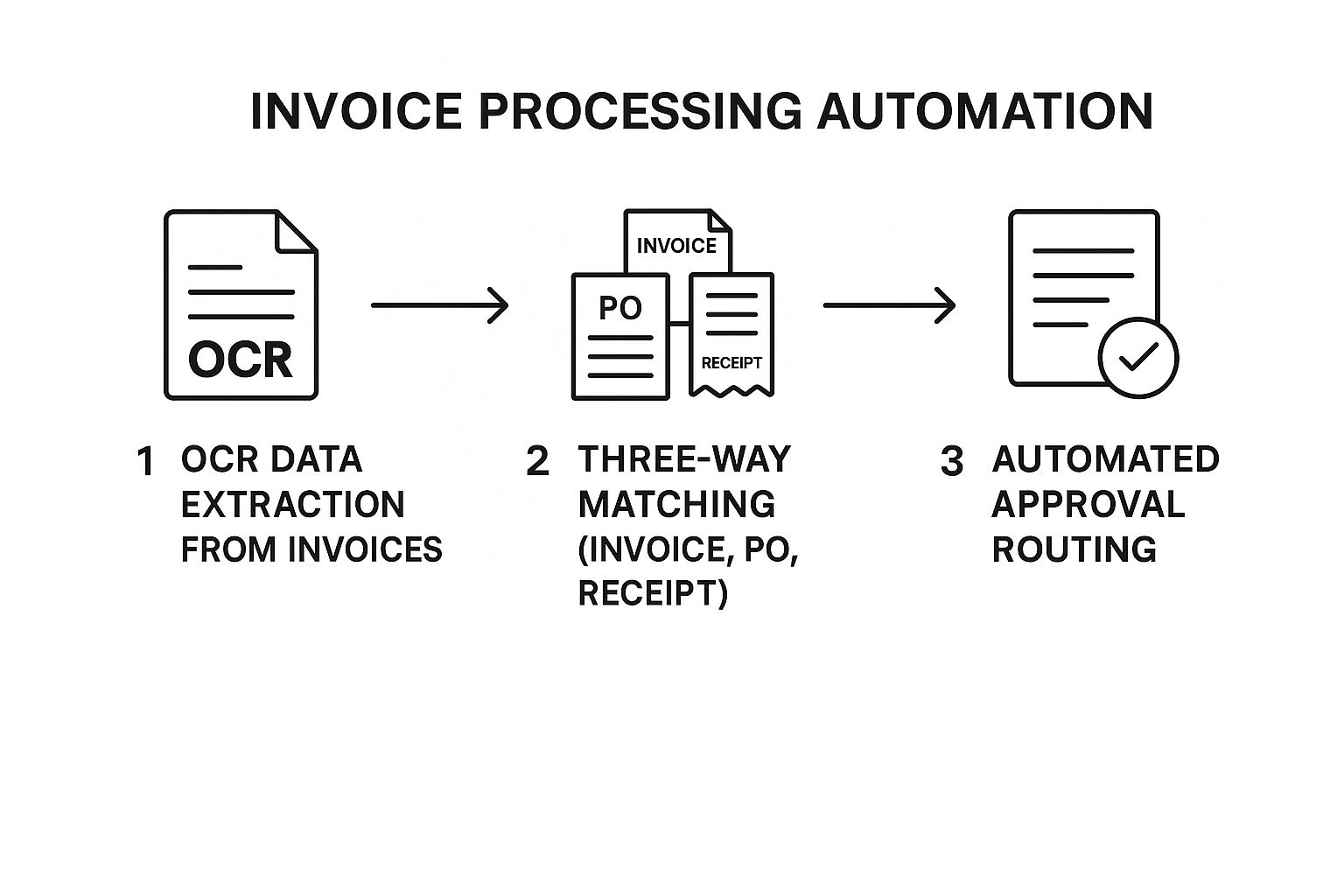
This streamlined process significantly reduces the chance of errors and creates a clear, auditable trail for every transaction.
Actionable Takeaways
To implement this effectively, start small with high-volume, standardized invoices from your key vendors. This allows you to refine the process before expanding.
- Clean Your Data: Ensure your vendor master data is accurate and complete. Mismatched information is a common point of failure.
- Define Clear Rules: Establish precise approval hierarchies and payment thresholds within the automation software.
- Standardize Exception Handling: Create a clear, documented procedure for handling invoices that the system flags for manual review. This prevents flagged invoices from getting lost in the workflow.
2. Customer Onboarding Automation
Manual customer onboarding is a major source of friction and potential churn. It can be slow, inconsistent, and requires significant manual effort, leading to a poor first impression. Customer onboarding automation streamlines the process of welcoming new clients by using integrated workflows for account setup, identity verification, document collection, and initial communications. This is a critical one of the business process automation examples as it directly impacts customer satisfaction, retention, and time-to-value.
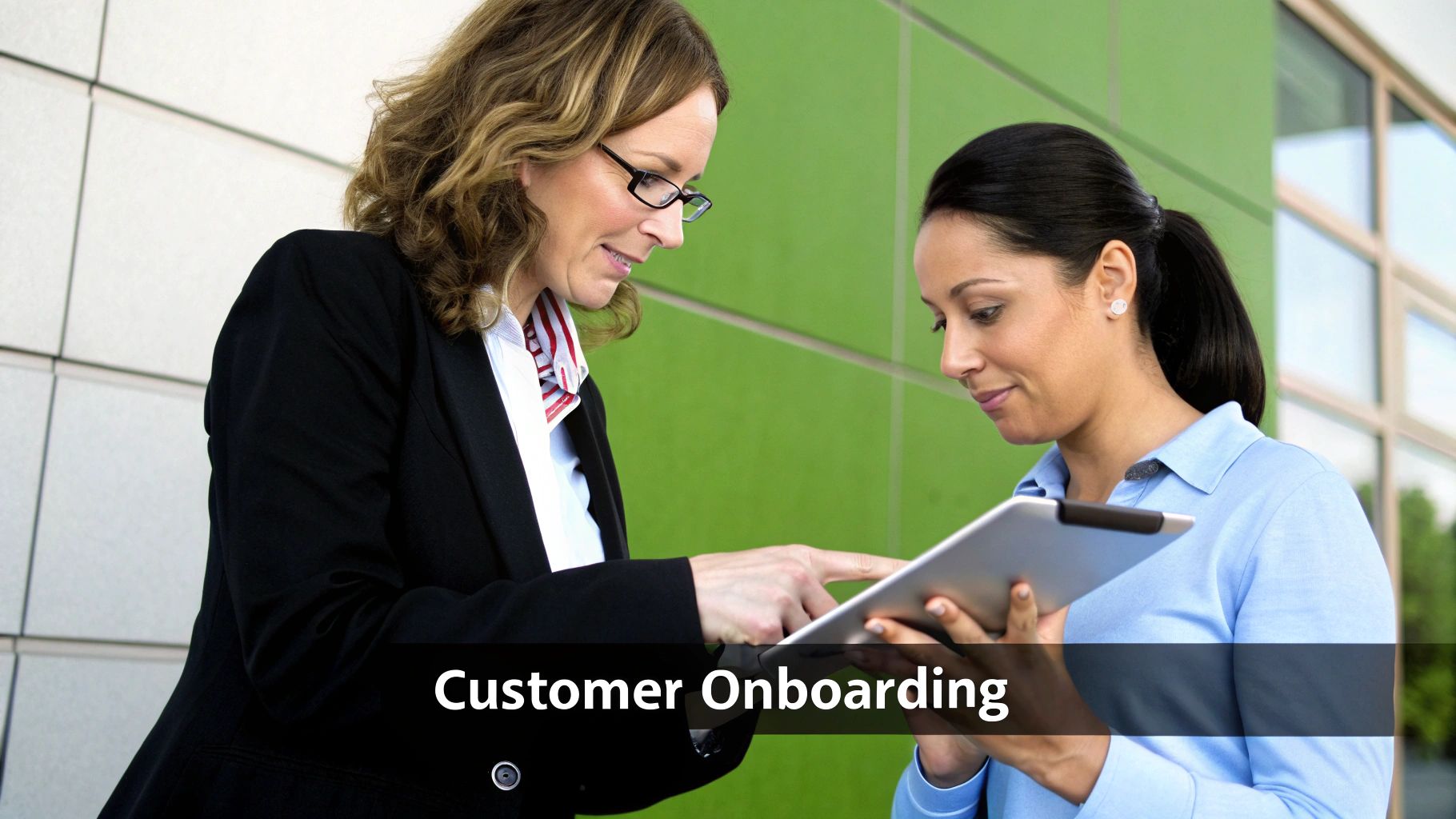
Fintech companies like Revolut leverage this to onboard new users in minutes, using automated identity verification instead of manual checks. This creates a seamless, secure experience that establishes trust from the very first interaction.
How It Works: The Automated Workflow
The goal of automated onboarding is to guide the user from signup to activation with minimal friction. The system triggers a sequence of actions based on user input, ensuring all necessary steps are completed efficiently.
This automated sequence ensures consistency and compliance while delivering a fast, modern experience. To explore this topic further, you can learn more about SaaS onboarding best practices.
Actionable Takeaways
To implement this successfully, focus on creating a journey that feels personalized and supportive, not robotic. The automation should remove obstacles, not create new ones.
- Map the Journey: Before automating, clearly map every step of your ideal customer onboarding process, from the initial sign-up to the first "aha!" moment.
- Use Progressive Profiling: Instead of asking for all information upfront, collect data in small, logical steps as the user engages with your product.
- Create Human Handoffs: Design clear escalation paths for complex cases or high-value customers where manual intervention is necessary.
3. Employee Payroll Processing
Manual payroll processing is a high-stakes, repetitive task fraught with risk. Errors in calculations, tax withholdings, or payments can lead to severe compliance penalties and damage employee morale. Payroll automation eliminates these risks by managing the entire cycle, from calculating hours and deductions to executing direct deposits and filing tax reports, without manual input. This is a critical one of the business process automation examples as it guarantees accuracy, timeliness, and legal compliance.
Platforms like Gusto enable small businesses to run their entire payroll in just a few minutes, while enterprise solutions from companies like ADP manage payroll for millions of employees globally. The system integrates with time-tracking and HR software to pull accurate data, automatically calculates gross-to-net pay, and ensures every employee is paid correctly and on time.
How It Works: The Automated Workflow
Automated payroll processing follows a precise sequence to ensure every calculation is accurate and compliant. The system connects data sources, applies predefined rules, and executes payments and reporting in a secure, auditable flow. This eliminates the need for manual spreadsheets and reduces the processing time from days to minutes.
The infographic below outlines the typical four-stage process of an automated payroll system.
This automated cycle ensures that payroll is not only fast but also transparent and error-free, building trust and freeing up HR resources for more strategic initiatives.
Actionable Takeaways
To ensure a smooth transition to automated payroll, focus on data integrity and clear procedural documentation from the outset. A well-prepared implementation prevents common payroll errors.
- Validate All Data: Before going live, conduct a thorough audit of all employee data, including tax information, pay rates, and bank details.
- Establish Exception Protocols: Define and document a clear process for handling exceptions like off-cycle payments, bonuses, or corrections.
- Keep Regulations Updated: Choose a system that automatically updates with the latest federal, state, and local tax regulations to maintain compliance.
- Run a Parallel Pay Run: For your first automated cycle, run it alongside your manual process to compare results and catch any discrepancies before finalizing payments.
4. Lead Qualification and Nurturing
Manually sifting through leads to identify high-potential prospects is inefficient and often leads to missed opportunities. Sales and marketing teams spend countless hours on leads that never convert, while promising ones go cold. Lead qualification and nurturing automation solves this by using scoring models and personalized communication to systematically identify, engage, and advance prospects through the sales funnel. This is a critical one of the business process automation examples as it directly bridges the gap between marketing efforts and sales revenue.
Companies that master this see significant gains. For example, HubSpot customers report a 451% increase in qualified leads, while Marketo helped Adobe boost its lead-to-opportunity conversion rate by 130%. The system works by assigning points to leads based on their demographic data and behavior (like email opens, page visits, and content downloads). High-scoring leads are then automatically routed to sales, while others are entered into targeted nurturing campaigns.
How It Works: The Automated Workflow
The automation engine manages the entire top-of-funnel journey, ensuring that no lead is left behind. It segments prospects based on interest and readiness, delivering the right message at the right time to guide them toward a purchase decision. This ensures sales teams only engage with prospects who are truly sales-ready.
This automated system creates a powerful feedback loop. As sales outcomes are recorded, the lead scoring and nurturing algorithms can be refined, continuously improving the quality of leads passed from marketing to sales and enhancing overall SaaS lead generation effectiveness.
Actionable Takeaways
To build an effective lead management machine, start by clearly defining what a "qualified lead" means for your business. This alignment between marketing and sales is the foundation for success.
- Define Clear Scoring Criteria: Use historical data to identify the attributes and behaviors of your best customers. Build your lead scoring model around these proven indicators.
- Create Persona-Specific Nurturing Tracks: Develop tailored email sequences and content offers that address the unique pain points and interests of each buyer persona.
- Implement Lead Decay: Automatically reduce a lead's score over time if they become inactive. This keeps your pipeline fresh and focused on engaged prospects.
- Use Progressive Profiling: Don't ask for all information at once. Use forms that incrementally gather more data as a lead engages with more content, reducing friction and improving conversion rates.
5. IT Service Desk Automation
Manual IT support is a major drain on resources, often leaving employees waiting for help with simple, repetitive issues. IT service desk automation addresses this by using AI-powered chatbots, self-service portals, and intelligent ticket routing to resolve common requests instantly. This is one of the most effective business process automation examples for improving internal efficiency, as it frees up skilled IT professionals to focus on complex, high-value tasks.

Companies like Microsoft have automated over 70% of their internal IT requests, showcasing the massive potential of this approach. The system works by diagnosing incoming tickets, providing instant solutions for common issues like password resets or software access, and automatically routing more complex problems to the correct specialist. This drastically reduces resolution times and improves employee satisfaction. You can learn more about AI-powered service automation on saasoperations.com.
How It Works: The Automated Workflow
The core of this automation is a tiered system that deflects simple tickets and intelligently escalates complex ones. It leverages a comprehensive knowledge base to provide instant answers and follows predefined rules to ensure every issue is handled by the right person, minimizing delays and back-and-forth communication. This creates a highly efficient support ecosystem.
Actionable Takeaways
To succeed with IT service desk automation, focus on building a robust self-service foundation before expanding to more complex workflows. This ensures users can solve their own problems first.
- Start Small: Begin by automating high-volume, low-complexity requests like password resets or account lockouts.
- Build a Knowledge Base: Maintain a comprehensive and regularly updated knowledge base. This is the brain of your self-service portal and chatbot.
- Define Escalation Paths: Create clear, automated workflows for escalating tickets that cannot be resolved by the system to the appropriate human agent.
6. Purchase Order Processing
Manual purchase order (PO) creation is a significant administrative burden, often leading to procurement delays, Maverick spending, and a lack of purchasing visibility. PO automation streamlines the entire procure-to-buy process, from requisition to vendor communication. It automatically validates purchase requests against budgets, routes them for approval, and generates the final PO. This is one of the most critical business process automation examples for gaining control over company spending and improving supplier relationships.
Companies like Unilever have leveraged solutions from SAP Ariba to achieve 95% automated PO processing, dramatically improving efficiency. The system ensures that every purchase request adheres to predefined policies and budget constraints, generating a PO only after all approvals are secured. This creates a complete and easily searchable audit trail for every single purchase.
How It Works: The Automated Workflow
The automation transforms a multi-step, manual process into an efficient, rules-based workflow. It begins with an employee submitting a digital purchase requisition, which the system then automatically validates and routes based on preset rules like department, cost center, and total amount. This systematic approach ensures policy compliance and eliminates bottlenecks.
Once fully approved, the system generates a professional PO and sends it directly to the correct vendor, minimizing delays and potential for error. This process is foundational for accurate business process documentation as it creates a clear, consistent record of all procurement activities.
Actionable Takeaways
To implement PO automation effectively, focus on building a strong foundation of clear rules and clean data before launching the system company-wide.
- Define Clear Rules: Establish precise approval thresholds and routing logic. For example, requests under $500 might be auto-approved, while those over $10,000 require CFO approval.
- Maintain Vendor Data: Ensure your vendor master data, including contact information and payment terms, is accurate and regularly updated to prevent communication errors.
- Create Standard Templates: Use templates for common purchase categories to speed up the requisition process for employees and ensure data consistency.
7. Email Marketing Campaigns
Manually sending emails to every customer is impossible at scale. Email marketing automation solves this by creating personalized, trigger-based campaigns that respond to customer behaviors, preferences, and lifecycle stages. This system segments audiences dynamically, personalizes content, and optimizes send times to maximize engagement. It's one of the most vital business process automation examples for SaaS companies because it directly nurtures leads, onboards new users, and drives retention without constant manual effort.
Companies like Amazon attribute as much as 35% of their revenue to automated recommendation emails. Similarly, Netflix effectively reduces churn by using triggered emails to re-engage inactive subscribers. The system works by setting up "if-then" workflows: if a user signs up for a trial, then send them an onboarding sequence; if they abandon a cart, then send a reminder email.
How It Works: The Automated Workflow
The foundation of this automation is a set of predefined triggers and corresponding actions. This creates a responsive system that delivers the right message to the right person at the right time, guiding them through the customer journey. It moves beyond simple newsletters to create dynamic, personalized conversations that build relationships and drive conversions.
This automation is a core component of a broader strategy. To see how it fits into a larger framework, you can explore detailed guides on marketing automation for SaaS.
Actionable Takeaways
To get started, focus on high-impact customer journey points like onboarding or trial expiration. These are critical moments where timely, automated communication can make a significant difference.
- Define Clear Triggers: Base your automations on specific user actions, such as "signed up," "feature used," or "last login > 30 days." Vague triggers lead to ineffective campaigns.
- Segment Your Audience: Go beyond basic demographics. Segment users based on their behavior, plan type, or feature usage to deliver highly relevant content.
- Test and Optimize: Continuously A/B test subject lines, send times, and content. Use the performance data to refine your workflows and improve engagement metrics.
8. Expense Report Processing
Manually handling expense reports is a notorious administrative headache. It involves collecting paper receipts, tedious data entry, and manual policy checks, creating delays and frustration for both employees and finance teams. Expense report automation eliminates this friction by digitizing the entire workflow, from receipt capture to reimbursement. This is a powerful business process automation example as it improves employee satisfaction, ensures policy compliance, and provides real-time visibility into company spending.
Platforms like SAP Concur have revolutionized this area. For instance, PwC leveraged such a system to slash its expense processing costs by a staggering 60%. The automation works by allowing employees to snap photos of receipts with their phones. The system uses OCR to extract data, automatically categorizes the expense, and checks it against predefined company policies.
How It Works: The Automated Workflow
The automation transforms a manual, error-prone task into a seamless, mobile-first experience. It validates expenses in real time, flags policy violations, and routes reports through a digital approval chain. This ensures that every submitted expense is compliant and accurately recorded before it even reaches the finance department.
This automated flow significantly accelerates reimbursement cycles and provides finance leaders with an accurate, up-to-the-minute view of corporate spending, enabling better budget management and forecasting.
Actionable Takeaways
To successfully automate expense reporting, focus on creating a frictionless experience for employees while maintaining strict financial controls. A clear policy foundation is critical for the automation to function effectively.
- Implement Clear Policies: Your automation tool is only as good as the rules you give it. Clearly define and communicate your expense policies before launch.
- Leverage Mobile Capture: Encourage employees to use mobile apps to capture receipts immediately. This prevents lost receipts and procrastination.
- Integrate Corporate Cards: Connect your automation platform with corporate credit card feeds to automatically import transactions, reducing manual entry and simplifying reconciliation.
9. Inventory Management
Manual inventory tracking is a high-stakes guessing game that often leads to costly stockouts or expensive overstock situations. Inventory management automation replaces guesswork with data-driven precision, using real-time tracking, demand forecasting, and automated reordering to maintain optimal stock levels. This is a critical one of the business process automation examples because it directly protects revenue and minimizes carrying costs.
Global retailers like Walmart leverage these systems across their 10,500+ stores to ensure product availability and streamline logistics. The automation works by continuously monitoring inventory movement, predicting future demand based on sales data, and automatically generating purchase orders when stock levels hit predetermined thresholds.
How It Works: The Automated Workflow
The core of automated inventory management is a connected system that synchronizes sales, stock, and procurement data. This creates a self-regulating loop that prevents stock imbalances and ensures products are available when customers need them, without tying up excess capital in warehousing.
This automated cycle ensures that inventory levels are consistently optimized based on real-time data, reducing both the risk of lost sales and the cost of holding surplus stock.
Actionable Takeaways
To implement this effectively, start by ensuring the foundational data is clean and accurate. Garbage in, garbage out is especially true for inventory systems that rely on precise numbers.
- Establish Reorder Points: Set clear, data-backed reorder points and safety stock levels for each product based on historical demand and supplier lead times.
- Prioritize with ABC Analysis: Use ABC analysis to categorize inventory items. Focus your most sophisticated automation rules and monitoring on high-value "A" items.
- Integrate Key Systems: Ensure seamless integration between your inventory management software, sales channels (like your e-commerce platform), and supplier portals for end-to-end visibility.
10. Social Media Management
Manually managing multiple social media channels is time-intensive and often leads to inconsistent posting and missed engagement opportunities. Automating social media management allows marketing teams to schedule content, monitor brand mentions, and analyze performance across platforms from a single dashboard. This is one of the most visible business process automation examples, as it directly impacts brand presence and customer engagement by ensuring a consistent and timely content flow.
Platforms like Buffer have enabled brands like Shopify to increase social media engagement by an incredible 285%. The system works by allowing users to schedule posts in advance, using AI to suggest optimal posting times for maximum reach. It also aggregates incoming messages and mentions, making it easier to respond quickly and maintain a strong online community.
How It Works: The Automated Workflow
The core of this automation is a centralized content calendar and engagement hub. This system removes the need to log in to each platform individually, creating a streamlined process for content distribution, monitoring, and analysis. It ensures a cohesive brand voice and strategy across all social channels.
This automated approach simplifies complex social media strategies by organizing them into a clear, manageable workflow. It frees up marketers to focus on creating high-quality content rather than on the manual logistics of posting and monitoring.
Actionable Takeaways
To implement this successfully, start by building a comprehensive content calendar that aligns with your broader marketing campaigns. This creates a strategic foundation for your automated posting schedule.
- Define Your Brand Voice: Create clear guidelines for tone, language, and style. This ensures that even automated responses and scheduled posts feel authentic and on-brand.
- Leverage Social Listening: Use automation tools to monitor keywords and hashtags relevant to your industry. This helps you identify trending topics and join relevant conversations proactively.
- Optimize Posting Times: Don't rely on generic best practices. Use the platform’s analytics to determine the specific times your audience is most active on each channel and schedule your content accordingly.
Top 10 Business Process Automation Examples Comparison
| Automation Type | Implementation Complexity 🔄 | Resource Requirements ⚡ | Expected Outcomes 📊 | Ideal Use Cases 💡 | Key Advantages ⭐ |
|---|---|---|---|---|---|
| Invoice Processing Automation | High initial costs; complex exception handling | Requires clean master data; ERP/accounting integrations | Reduces processing time by up to 80%; 200-400% ROI | High-volume standardized invoices | Minimizes errors; improves cash flow; audit trails |
| Customer Onboarding Automation | Significant process mapping; regulatory oversight | Integration with CRM; compliance tools | Cuts onboarding time 60-90%; improves satisfaction | New client signup and verification | Ensures compliance; scales without extra staff |
| Employee Payroll Processing | Complex setup for varied pay structures | Integration with HRIS, tax systems | Saves 70-80% processing time; reduces compliance risks | End-to-end payroll management | Accurate payments; audit trails; scalable |
| Lead Qualification and Nurturing | Significant setup and regular tuning required | CRM and marketing platform integration | Boosts conversions 30-50%; shortens sales cycles | Marketing-sourced lead scoring and nurturing | Improves sales alignment; detailed lead insights |
| IT Service Desk Automation | Requires process documentation; knowledge base upkeep | AI, CMDB, monitoring tools integration | Automates 40-60% tickets; reduces resolution time | Routine IT support and ticket handling | 24/7 availability; cost reduction; higher satisfaction |
| Purchase Order Processing | Needs clear hierarchies and multi-system integration | ERP and vendor system integrations | Cuts PO time 75-90%; improves spend visibility | Procurement approvals and vendor communication | Controls maverick spend; audit trails; vendor relations |
| Email Marketing Campaigns | Complex workflow setup; frequent content updates | CRM, e-commerce platform integration | Increases email revenue by 320%; improves engagement | Personalized, behavior-triggered email campaigns | High ROI; precise targeting; scalable |
| Expense Report Processing | Requires detailed policy setup; employee training | OCR tech, mobile apps, accounting integrations | Reduces processing time 75%; improves compliance | Employee expense submission and reimbursement process | Fraud reduction; real-time spend visibility |
| Inventory Management | Complex for diverse products; supplier integration | Barcode/RFID, forecasting tools, multi-location systems | Lowers carrying costs 20-30%; minimizes stockouts | Stock level optimization and demand forecasting | Real-time visibility; automates reordering |
| Social Media Management | Continuous content curation and monitoring needed | Multi-platform scheduling and analytics tools | Saves 6-8 hours/week; improves response times | Scheduling posts and brand monitoring across platforms | Consistent posting; improved engagement analytics |
Putting Automation to Work: Your Next Steps to a Smarter SaaS
We've explored a wide range of business process automation examples, from streamlining invoice processing and employee payroll to supercharging lead nurturing and social media management. The common thread connecting all these use cases is the profound impact of shifting from manual, repetitive work to intelligent, automated workflows. This isn't just about saving time; it's about reallocating your team's most valuable resource, their brainpower, to strategic initiatives that drive growth.
The examples in this guide demonstrate that automation is no longer a luxury reserved for large enterprises. For a modern SaaS business, it's a fundamental operational lever. By automating rule-based tasks, you create a more consistent, error-free, and scalable foundation. This allows your team to focus on complex problem-solving, customer relationships, and product innovation, which are the true differentiators in a competitive market.
Key Takeaways for Your SaaS
Reflecting on the processes we've covered, several core principles stand out:
- Start Small, Scale Smart: You don't need to automate your entire business overnight. Identify a single, high-friction process like customer onboarding or expense reporting. A small win builds momentum and provides a clear ROI to justify further investment.
- Data is Your Compass: Effective automation relies on clean, accessible data. Whether it's qualifying leads based on CRM data or managing inventory with real-time stock levels, your automation's success is directly tied to the quality of your inputs.
- Human-in-the-Loop is a Strategy: Automation isn't about replacing people; it's about augmenting them. For processes like IT service desk requests or complex purchase order approvals, the best systems use automation to handle the initial steps and then intelligently route exceptions to the right human for a final decision.
Your Actionable Roadmap to Automation
Now is the time to turn these insights into action. The journey to a more efficient SaaS operation begins with a single, deliberate step. Here’s a simple framework to get started:
- Identify Your Biggest Bottleneck: Where does work get stuck? Ask your team which manual tasks consume the most time or cause the most errors. Is it finance, marketing, or customer support?
- Map the Current Process: Before you can automate, you must understand the existing workflow. Document every step, decision point, and stakeholder involved. This map will reveal the best opportunities for automation.
- Choose the Right Tools: Based on your process map, select the appropriate software. This might be a dedicated accounting platform, a CRM with built-in automation, or a versatile integration tool like Zapier.
- Implement, Test, and Iterate: Launch your first automated workflow and monitor its performance closely. Gather feedback, measure the impact on your KPIs, and continuously refine the process. To further explore how automation can transform different areas of your business, delve into more business process automation examples for scaling operations.
Ultimately, mastering business process automation is about building a more resilient, efficient, and intelligent organization. It empowers your team to work smarter, not harder, creating a powerful engine for sustainable growth.
Ready to move beyond examples and implement a holistic automation strategy for your company? SaaS Operations provides the playbooks and frameworks you need to build scalable, automated systems across your entire business. Visit SaaS Operations to discover how to turn your operational processes into a competitive advantage.