
Ever wonder how some companies seem to run like a well-oiled machine, even as they grow at lightning speed? The secret isn't magic—it's process documentation.
Simply put, process documentation is the act of creating a clear, step-by-step guide for any recurring task in your business. It’s the official instruction manual for your operations, making sure every important job gets done right, every single time.
What Is Process Documentation, Really?

Think of it like this: your SaaS company is a Michelin-star restaurant, and you've just perfected a signature dish. How do you make sure every chef can recreate it flawlessly? You don't leave it to chance. You write down the recipe.
Process documentation is that recipe book for your business.
It captures all the crucial details for everything from onboarding a new client to resolving a support ticket. This turns that hard-won "tribal knowledge" locked inside your team's heads into a reliable, shared resource anyone can use. Without it, you’re basically asking people to guess, which inevitably leads to sloppy work, wasted hours, and unhappy customers.
Beyond a Simple Definition
So, what is process documentation at its core? It's a strategic tool for creating a single source of truth for how your company operates. For a SaaS business trying to scale, this isn't just a "nice-to-have." It's the foundation you build on. To get a better handle on this, it helps to understand the fundamentals of documenting business processes as a core business practice.
Effective documentation does a few critical things for a growing company:
- It empowers your team. Clear instructions cut down on guesswork and endless questions, freeing people up to solve bigger problems.
- It creates consistency. When everyone follows the same playbook, you deliver a predictable, high-quality experience for your customers. No more "it depends who you ask."
- It makes onboarding a breeze. New hires can become productive much faster when they have a guide to follow, instead of constantly tapping senior employees on the shoulder.
This is especially true for customer-facing teams. A solid process is what separates a good customer success team from a great one, ensuring every interaction is meaningful and effective. In fact, a detailed process is the heart of any strong [https://saasoperations.com/customer-success-playbook/].
Process documentation isn’t about stifling creativity with rigid rules. It’s about creating a solid baseline for excellence, which actually enables innovation. It handles the "how" so your team can focus on the "why" and "what's next."
To give you a clearer picture, let's break down the main jobs that process documentation handles within a business.
Core Functions of Process Documentation
This table offers a quick look at the primary goals and functions that effective process documentation serves within an organization.
| Function | Primary Goal | Impact on Business |
|---|---|---|
| Standardization | Ensure tasks are performed consistently across the board. | Improves quality control and delivers a reliable customer experience. |
| Training & Onboarding | Provide a self-serve resource for new and existing employees. | Drastically reduces the time it takes for new hires to become productive. |
| Knowledge Preservation | Capture critical information that might otherwise be lost when an employee leaves. | Protects the company from knowledge gaps and operational disruptions. |
| Process Improvement | Create a baseline to identify bottlenecks and areas for optimization. | Enables continuous improvement and drives operational efficiency. |
Ultimately, having these functions covered transforms your company's big-picture goals into concrete, daily actions. It’s the bridge between your vision and what your team actually does every day to make it happen. By formalizing how work gets done, you build a more resilient, efficient, and scalable business ready for whatever comes next.
Why Documenting Processes Is a Strategic Move

Let's move past the textbook definition of process documentation. This isn't just about creating tidy checklists or manuals that gather dust. It’s a powerful strategic move that directly fuels growth, resilience, and profitability—especially for a SaaS company on the verge of scaling up.
It's easy to dismiss documentation as a tedious administrative task. That's a huge mistake. Think of it as an investment in building a predictable, efficient, and high-performing operational machine. It turns your company's abstract goals into repeatable actions that anyone on your team can execute flawlessly.
Accelerate Onboarding and Reduce Ramp Time
One of the fastest returns you'll see from documenting your processes is with new hires. Without clear guides, new team members often spend weeks just trying to figure out their responsibilities, constantly pulling senior staff away from their work for basic questions. This slows everyone down.
With solid documentation, a new customer support agent or marketing specialist can become a productive contributor in days, not weeks. They have a self-serve resource to answer their questions and build their confidence, letting them start delivering value almost immediately. It empowers them to learn on their own and become part of the team much faster.
This is just one of the ideas we explore in our guide to business process documentation for building a more efficient team.
Documentation is the ultimate safeguard against the "bus factor"—the risk your company faces if a key employee with critical knowledge suddenly leaves. It ensures the business keeps running by making knowledge a shared asset, not a private one.
By its very nature, documenting how things get done is a direct way to improve efficiency in your workflow. You're defining the single best way to complete a task, which cuts out wasted effort and gives your team a clear path to follow. That's essential for keeping momentum as you grow.
Guarantee a Consistent Customer Experience
In the SaaS world, consistency is everything. Customers expect the same excellent service every single time they interact with your brand, no matter who they talk to. Process documentation is what makes that consistency possible.
When you have a documented process for handling a feature request, managing a subscription upgrade, or troubleshooting a common problem, you ensure every team member follows the same best practices. This systematic approach pays off big time.
- Higher Customer Satisfaction: Customers get reliable, predictable service, which builds trust and keeps them around.
- Reduced Errors: Standardized procedures cut down on mistakes that can frustrate users and create support tickets.
- Scalable Quality: As you hire more people, you can maintain your high standards without watering down the customer experience.
Build a Foundation for Systematic Growth
At the end of the day, process documentation is about building a business that can scale without breaking. It provides the operational bedrock needed to support a growing team and an expanding customer base.
This structured approach is becoming a major economic driver. The Australian document preparation services industry, which is closely tied to this work, was valued at around $307.5 million in 2024. This just goes to show the growing global recognition that formalized processes are critical for business.
When you invest time in documenting how your business runs, you're doing more than just creating guides. You're building a resilient, adaptable framework that reduces chaos, empowers your team, and gets your company ready for whatever comes next.
Choosing The Right Documentation Format
You wouldn't use a sledgehammer to hang a picture frame, right? The same logic applies to your process documentation. Picking the right format is everything—it determines whether your guide gets used or just collects dust.
A simple checklist might be perfect for a daily task, but it would completely fall short when explaining a complex, multi-department project. It’s all about matching the format to the process's complexity and who's going to be using it. Think of it as a toolkit; your job is to pull out the right tool for the job.
For Simple And Repetitive Tasks
When a process is straightforward and needs to be done the exact same way every single time, simple is best. The goal here is to make it impossible to mess up.
- Checklists: These are your best friend for routine tasks, like daily system checks or getting a new hire set up on their first day. There’s something so satisfying about ticking off boxes and knowing nothing was missed.
- Step-by-Step Guides: A little more detailed than a checklist, these offer brief instructions for each action. They work great for things like setting up a new software account or processing a customer refund.
For these kinds of tasks, you don't need a novel. You just need enough information to get the job done right without overwhelming someone.
For Complex And Detailed Procedures
Then you have the big, complicated processes. The ones with multiple steps, critical decision points, and very specific standards. For these, you need something more robust that can handle all that detail without becoming a confusing mess.
This is where a Standard Operating Procedure (SOP) comes in. An SOP is a formal, all-inclusive document that lays out every single detail of a process. It usually covers the purpose, who’s involved, and a thorough breakdown of the instructions, often with screenshots.
SOPs are absolutely critical for:
- Ensuring Compliance: Perfect for processes tied to legal or regulatory rules.
- Maintaining Quality Control: Guarantees that important tasks, like pushing a new feature live, are always done to the highest standard.
- Preserving Knowledge: Captures that deep, "how we do things here" expertise and makes it available to everyone.
Basically, an SOP becomes the single source of truth for your most important workflows.
For Visualizing Workflows And Handoffs
Sometimes, the hardest part of a process isn't the steps themselves, but understanding how they all connect. When different people or teams are involved, a wall of text just creates confusion. That’s when you need to go visual.
The real power of visual documentation is its ability to make complex interactions instantly clear. A single diagram can often say more than pages of text, especially when you need to show how one team’s work affects another.
- Flowcharts: An amazing tool for mapping out a process with decision points (think: "If the customer replies, do this; if not, do that"). It gives you a bird's-eye view of the entire workflow.
- Swimlane Diagrams: This is like a flowchart on steroids. It organizes the process into "lanes," with each lane representing a different team or person. It’s perfect for making handoffs crystal clear and showing who is responsible for what.
These visual tools aren't just for documentation, either. They're fantastic for spotting bottlenecks and finding ways to make the process better.
For Training And Interactive Learning
Finally, think about how people will actually learn the process. For hands-on or highly technical tasks, a static document might not cut it. You need something more engaging.
Modern, interactive formats can make a huge difference in how quickly people pick things up. The options are broad, from simple flowcharts to full-blown video tutorials. This variety is what helps make sure everyone can learn effectively. Companies that nail this report higher consistency and get new hires up to speed much faster—you can even explore how Slack leverages different formats for collaboration to see it in action.
- Video Tutorials: There's no better way to demonstrate a software workflow. Actually seeing someone do it is often the quickest path to understanding.
- Interactive Walkthroughs: These are in-app guides that literally walk a user through a process step-by-step, prompting them to perform the actions. It’s learning by doing, and it’s incredibly effective for software training.
Choosing The Right Documentation Format
Picking the right format is a key step in creating documentation that people will actually use. A simple process might only need a checklist, while a complex, cross-functional workflow is better served by a swimlane diagram or a detailed SOP. The table below breaks down some common formats to help you decide.
| Format Type | Best For | Complexity Level |
|---|---|---|
| Checklist | Routine, multi-step tasks that require consistency (e.g., onboarding). | Low |
| Step-by-Step Guide | Simple procedures with a linear flow and minimal decision-making. | Low to Medium |
| Standard Operating Procedure (SOP) | Complex, formal processes requiring detail, compliance, and quality control. | High |
| Flowchart | Workflows with decision points, branches, and clear logical sequences. | Medium |
| Swimlane Diagram | Cross-functional processes to clarify handoffs and responsibilities. | High |
| Video Tutorial | Demonstrating software or physical tasks visually for easy learning. | Medium to High |
| Interactive Walkthrough | Hands-on software training where users learn by doing within the app. | High |
Ultimately, by choosing the right format, you're doing more than just writing things down. You're creating a truly useful resource that empowers your team, cuts down on mistakes, and helps you build a more efficient and scalable operation.
How to Create Effective Process Documentation
Knowing you need process documentation is one thing. Actually creating it? That's a whole different ballgame. It can feel like a massive undertaking, but if you break it down into a clear, step-by-step approach, it becomes much more manageable. Think of it like building with LEGOs—you start with the foundation and add pieces one by one until you have a complete, functional structure.
This isn't just about writing things down. It's a structured journey of figuring out your goals, gathering knowledge from the right people, writing clear instructions, and making sure the final document is both accurate and genuinely easy to use. The following steps are a practical blueprint for creating documentation that your team will actually want to follow.
This simple visual breaks down the lifecycle of great process documentation.
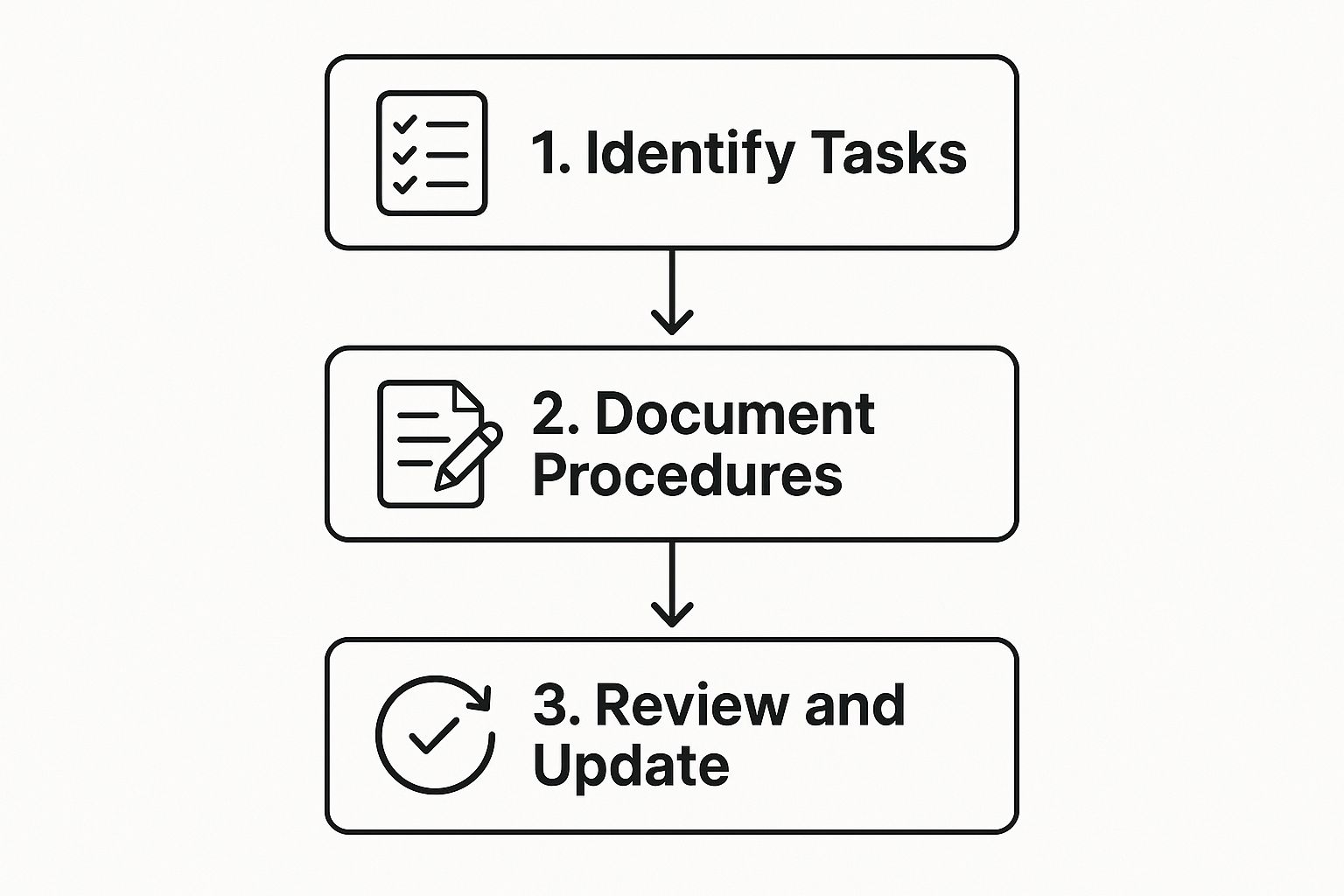
As you can see, documentation isn't a one-and-done project. It’s a continuous cycle of creation, review, and improvement.
Define the Scope and Goals
Before you write a single word, you have to know what you’re documenting and, more importantly, why. Trying to document everything at once is a surefire recipe for failure. Instead, start small by clearly defining the process and its boundaries.
Ask yourself these key questions:
- What is the specific process? Get granular. Instead of a vague goal like "document customer support," narrow it down to something specific, like "how to escalate a high-priority support ticket."
- What is the goal of this document? Are you trying to cut down on errors, speed up training for new hires, or ensure compliance? A clear goal helps you focus only on what matters.
- Who is the audience? A guide for a junior employee on their first day will look very different from one written for a senior engineer. You have to write for your audience’s level of knowledge.
By setting a clear scope from the get-go, you create a well-defined container for your work. This simple step makes the entire project far less overwhelming.
Gather Knowledge from the Experts
You can't document a process you don't fully understand. The next, and arguably most critical, step is to gather information from the people who know the process inside and out—your subject matter experts (SMEs). These are the folks who perform the task day in and day out.
Their insights are pure gold. Sit down with them and have them walk you through the process from start to finish.
- Observe them in action: Watching someone perform the task in real-time often reveals tiny but crucial steps they might forget to mention in an interview.
- Ask open-ended questions: Instead of "yes/no" questions, try "Can you show me how you do that?" or "What’s the most common mistake people make here?"
- Record everything: Take detailed notes, snap screenshots, or even take a screen recording (with their permission, of course). You can always edit down later, but you can’t get back information you missed.
This collaborative approach not only guarantees accuracy but also creates buy-in from the team. When people help build the documentation, they feel a sense of ownership and are far more likely to actually use it.
Draft the Content with Clarity
With all your information gathered, it's time to start writing. The golden rule here is clarity over complexity. Ditch the corporate jargon and write in simple, direct language that anyone can understand.
Break the process down into small, actionable steps. A great way to do this is by using a standardized format. A template ensures consistency across all your documents, making them much easier for everyone to read and follow. If you need a solid starting point, you can explore this ready-to-use https://saasoperations.com/standard-operating-procedures-template/ to keep your formatting uniform.
And don't forget to add visual aids!
- Screenshots: Show exactly where to click or what to look for.
- Flowcharts: Illustrate decision points and different paths within the workflow.
- Short video clips: For complex software steps, a quick video can be worth a thousand words.
A common mistake is assuming your reader knows what you know. Write as if you’re explaining the process to someone who has never done it before. This forces you to be thorough and leave no room for guesswork.
For more detailed strategies and practical advice, you can also explore these expert tips on how to create process documentation to really refine your approach.
Establish a Review and Approval Workflow
No first draft is perfect. Ever. Once you’ve written the document, it’s crucial to have it reviewed by the same SMEs who provided the information in the first place. This step is your quality check—it validates accuracy and catches any gaps or confusing parts.
Set up a simple review process:
- Initial Review: The SME checks the document for technical accuracy. Did you miss a step? Is anything unclear?
- Peer Review: Ask someone who isn't familiar with the process to try following your instructions. If they get stuck, you know you need to make improvements.
- Final Approval: A manager or team lead gives the final sign-off, officially making the document the "source of truth" for that process.
This feedback loop ensures your documentation is not just accurate but genuinely useful. By following these four phases—scoping, gathering, drafting, and reviewing—you can systematically turn chaotic workflows into clear, effective process documentation that empowers your team and helps your business run smoothly.
Modern Tools for Documenting Your Processes
https://www.youtube.com/embed/e6VhsSNiDYQ
Let's be honest: the old way of documenting processes is dead. Static Word docs and PDFs buried in a forgotten shared drive just don't cut it anymore. Today’s process documentation needs to be dynamic, interactive, and woven right into your team's daily work.
The right tools can turn your processes from a dusty, forgotten manual into a living, breathing system that actually drives your business forward. Instead of being an afterthought, documentation becomes a central part of your operations—a single source of truth everyone can rely on. For any SaaS company trying to scale without descending into chaos, this isn't just nice to have; it's essential.
The good news is there's a huge range of technology out there, from simple wikis to powerful automation platforms. Let's look at how to pick the right one for you.
Centralized Knowledge Bases and Wikis
The first and most important step is to get all your documentation out of scattered files and into one central hub. Think of tools like Confluence or Notion as your company’s internal library. Everything lives in one searchable, organized place.
This simple shift has a massive impact:
- Easy Access: No more bugging colleagues for the right link. Anyone can find what they need, right when they need it.
- No More Version Confusion: Forget wondering if you have the latest "final_v3_final" version of a document. A central wiki always shows the most current information.
- Built for Teamwork: These platforms are designed for collaboration. Your team can comment, edit, and improve documents together in real-time.
Building this shared knowledge base is a foundational piece of modern SaaS operations management, making sure information moves smoothly across your entire company.
Workflow Management and Automation Platforms
Once you have your processes documented, the next level is to make them actionable. This is where tools like Process Street come in. They don't just store your instructions; they turn them into interactive checklists and automated workflows that guide your team step-by-step.
Instead of just reading a "how-to" guide, your team members are actively checking off tasks, triggering approvals, and letting the system handle the routine stuff automatically. This is where documentation stops being passive and starts doing the work.
The real magic here is that these platforms enforce consistency without you having to micromanage. They don't just tell someone how to do a task; they give them the exact framework to get it done right, every single time.
This closes the all-too-common gap between knowing what to do and actually doing it correctly.
The Power of Transparent Process Tracking
A truly game-changing feature in many modern tools is the ability to see exactly what happened, when, and who did it. Workflow tracking technologies, like a Workflow History Timeline, have completely changed the game by creating a visual, chronological record of every single step, decision, and update in a process.
This means you can finally measure and analyze your workflows with real data, tracking timestamps and tying actions to specific team members. By linking comments, approvals, and files directly to each step, you get a crystal-clear audit trail. This level of transparency boosts accountability and makes it much faster to troubleshoot problems—two things that are critical in today's market. You can learn more about how workflow history revolutionizes process tracking on ones.com.
Ultimately, investing in the right technology does more than just organize your SOPs. It transforms your documentation from a passive reference guide into an active system for running your business better. It makes everyone more accountable, simplifies updates, and creates a clear trail that fuels continuous improvement, helping you scale with confidence.
Common Questions About Process Documentation
Even with the best intentions, questions always come up when you start turning theory into practice. This is where the rubber meets the road. Getting ahead of these common hurdles can be the difference between a documentation system that people actually use and one that gathers digital dust.
Let's walk through the questions I hear most often. We'll cover everything from update schedules to getting your team to buy in.
How Often Should I Update My Process Documentation?
This is probably the most common question I get, and the answer is simpler than you might think: your documentation has to be a living, breathing thing. It's not a library archive. An outdated document is often worse than no document at all—it teaches your team that the official guides can't be trusted.
A good rule of thumb is to set up a regular review schedule. For your most critical, high-impact processes, I'd suggest reviewing them at least quarterly or semi-annually. For less-vital tasks, a yearly check-in is probably fine.
But the most important rule is this: update the document the moment something changes. This could be triggered by:
- New Software: You swap out a tool or a major update changes the workflow.
- Team Restructuring: Roles and responsibilities get shuffled around.
- Process Improvement: Someone on the team finds a smarter way to do something.
- Customer Feedback: A customer points out a weak spot in your process.
Your goal is to make sure the documentation always reflects how work actually gets done.
What Is the Biggest Mistake to Avoid?
The single biggest mistake I see companies make is creating a bunch of documents and then walking away. It’s the classic "set it and forget it" trap. Once your guides become stale, they lose all credibility, and your team will stop using them.
An outdated process document is a promise you're no longer keeping. It tells your team that the official way isn't the real way, forcing them to rely on guesswork and tribal knowledge all over again.
To sidestep this common pitfall, you have to build ownership and accountability right into the system from day one.
- Assign a Clear Owner: Every single document needs one person who is responsible for keeping it current.
- Build in a Review Cycle: Don't just hope people will review things. Schedule these reviews on your team's calendar like any other important task.
- Make Updates Easy: Give everyone a simple, frictionless way to flag something that's out of date or suggest an improvement.
Will Documenting Our Processes Kill Creativity?
This fear comes up a lot, especially on innovative, fast-moving teams. People worry that writing things down will create rigid bureaucracy that chokes out creative thinking. In my experience, the opposite is true.
Good process documentation doesn't lock your team in a cage. It creates a reliable, consistent baseline for handling essential tasks.
This actually frees up your team's mental energy. Instead of constantly trying to remember basic steps or reinventing the wheel, they can focus their brainpower on work that really matters, like:
- Strategic Problem-Solving: Figuring out the why behind a customer issue, not just the how of logging a support ticket.
- Process Innovation: Brainstorming better, faster, or more efficient ways to get the job done.
- Customer-Centric Work: Spending more time delivering an amazing experience.
Think of it as the foundation for improvement. You can’t improve a process you haven’t defined. Once you have a clear starting point, your team has a launchpad for making things better. It’s also a key step when you need to understand where your current operations fall short. You can learn more about this by exploring how to perform a gap analysis to find areas for improvement.
How Do I Get My Team to Actually Use the Documentation?
Ah, the million-dollar question. You can create the most beautiful, detailed process library in the world, but if nobody uses it, it’s worthless. Adoption is everything.
Getting buy-in isn't about top-down mandates. It's about making the documentation genuinely helpful and weaving it into your team's daily workflow.
- Involve Them in Creation: The fastest way to get buy-in is to have the team help build the documents in the first place. People always support what they help create.
- Make It Insanely Easy to Find: Put everything in one central, searchable spot. If it takes someone more than 30 seconds to find what they need, they'll give up and ask a coworker instead.
- Integrate It into Key Workflows: Make the documentation a core part of onboarding new hires, training sessions, and even performance reviews. Frame it as a tool for success, not an extra chore.
- Lead by Example: This is the most important piece of the puzzle. Leaders and managers have to use, reference, and champion the documentation constantly. When your team sees you taking it seriously, they will too.
At SaaS Operations, we provide battle-tested playbooks and templates that help you build these essential systems without starting from scratch. Our resources are designed by operators for operators, helping you implement clear processes that save time and accelerate growth. Check out our proven frameworks at https://saasoperations.com.